OpenTelemetry
To start using OpenTelemetry, install @elysia/opentelemetry and apply the plugin to any instance.
bun add @elysia/opentelemetry@next @opentelemetry/sdk-trace-node @opentelemetry/exporter-trace-otlp-protoimport { Elysia } from 'elysia'import { opentelemetry } from '@elysia/opentelemetry'
import { BatchSpanProcessor } from '@opentelemetry/sdk-trace-node'import { OTLPTraceExporter } from '@opentelemetry/exporter-trace-otlp-proto'
new Elysia() .use( opentelemetry({ spanProcessors: [ new BatchSpanProcessor( new OTLPTraceExporter() ) ] }) )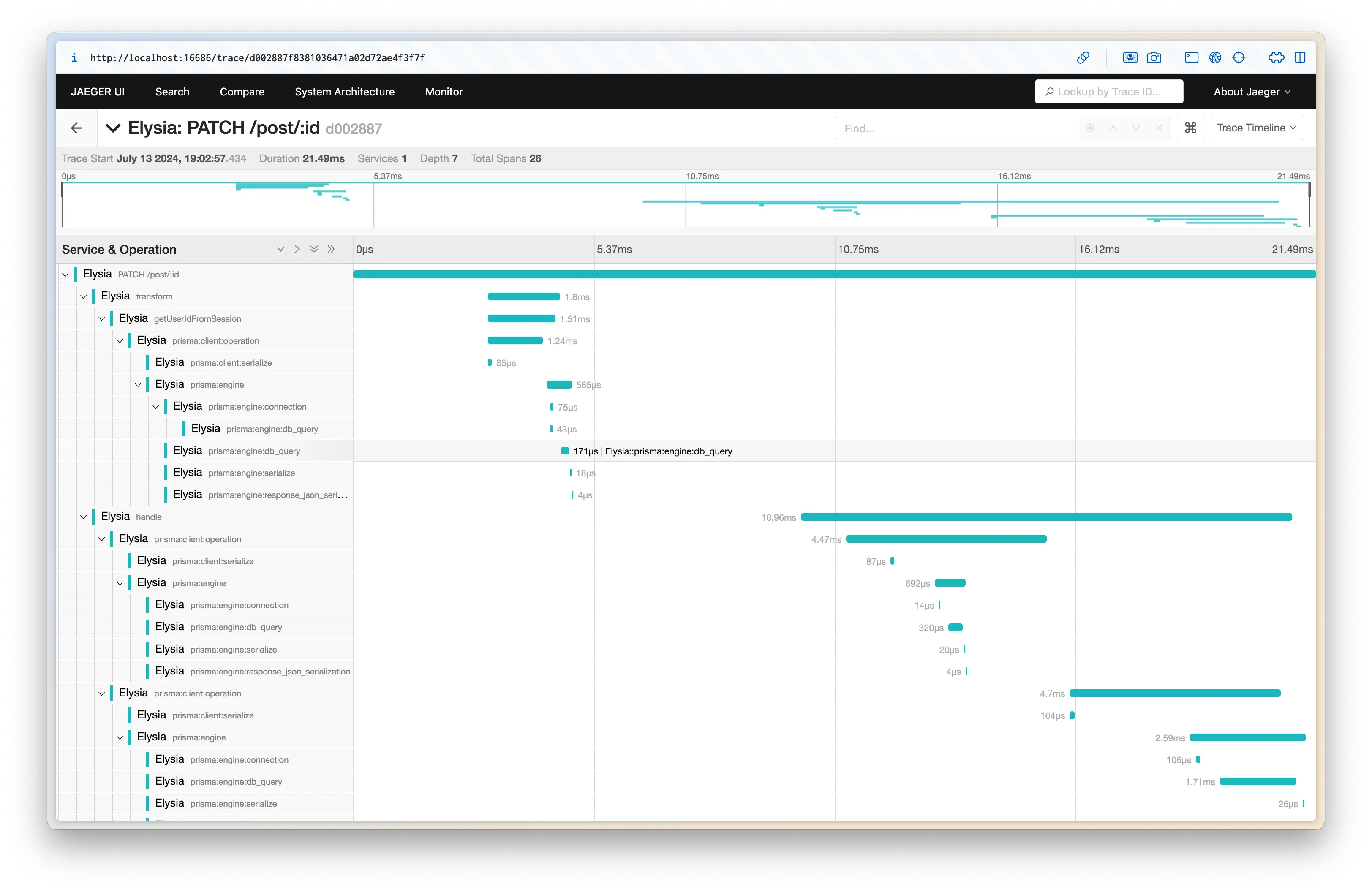
Elysia OpenTelemetry will collect spans from any library compatible with the OpenTelemetry standard, and will apply parent and child spans automatically.
See opentelemetry for usage and utilities
Config
Section titled “Config”This plugin extends OpenTelemetry SDK parameter options.
Below is a config which is accepted by the plugin
autoDetectResources - boolean
Section titled “autoDetectResources - boolean”Detect resources automatically from the environment using the default resource detectors.
Default: true
contextManager - ContextManager
Section titled “contextManager - ContextManager”Use a custom context manager.
Default: AsyncLocalStorageContextManager, registered by NodeTracerProvider
textMapPropagator - TextMapPropagator
Section titled “textMapPropagator - TextMapPropagator”Use a custom propagator.
Default: CompositePropagator using W3C Trace Context and Baggage
metricReader - MetricReader
Section titled “metricReader - MetricReader”Add a MetricReader that will be passed to the MeterProvider.
views - View[]
Section titled “views - View[]”A list of views to be passed to the MeterProvider.
Accepts an array of View-instances. This parameter can be used to configure explicit bucket sizes of histogram metrics.
instrumentations - (Instrumentation | Instrumentation[])[]
Section titled “instrumentations - (Instrumentation | Instrumentation[])[]”Configure instrumentations.
No instrumentations are registered by default. Pass a list, such as getNodeAutoInstrumentations() from @opentelemetry/auto-instrumentations-node (installed separately), to enable them.
Default: none
resource - IResource
Section titled “resource - IResource”Configure a resource.
Resources may also be detected by using the autoDetectResources method of the SDK.
resourceDetectors - Array<Detector | DetectorSync>
Section titled “resourceDetectors - Array<Detector | DetectorSync>”Configure resource detectors. By default, the resource detectors are [envDetector, processDetector, hostDetector]. NOTE: In order to enable the detection, the parameter autoDetectResources has to be true.
If resourceDetectors is not set, you can also use the environment variable OTEL_NODE_RESOURCE_DETECTORS to enable only certain detectors, or completely disable them:
- env
- host
- os
- process
- serviceinstance (experimental)
- all - enable all resource detectors above
- none - disable resource detection
For example, to enable only the env and host detectors:
export OTEL_NODE_RESOURCE_DETECTORS="env,host"sampler - Sampler
Section titled “sampler - Sampler”Configure a custom sampler. By default, all traces will be sampled.
serviceName - string
Section titled “serviceName - string”Namespace to be identified as.
spanProcessors - SpanProcessor[]
Section titled “spanProcessors - SpanProcessor[]”An array of span processors to register to the tracer provider.
traceExporter - SpanExporter
Section titled “traceExporter - SpanExporter”Configure a trace exporter. If an exporter is configured, it will be used with a BatchSpanProcessor.
If an exporter OR span processor is not configured programmatically, this package will automatically set up the default otlp exporter with http/protobuf protocol with a BatchSpanProcessor.
spanLimits - SpanLimits
Section titled “spanLimits - SpanLimits”Configure tracing parameters. These are the same trace parameters used to configure a tracer.
checkIfShouldTrace - (request: Request) => boolean
Section titled “checkIfShouldTrace - (request: Request) => boolean”Decide whether a request is traced. Return false to skip tracing for that request.
Default: every request is traced
spanUrlRedaction - false | object
Section titled “spanUrlRedaction - false | object”Redact credentials and sensitive query values (such as token, password, api_key) in the recorded URL. Accepts { stripCredentials?: boolean, sensitiveQueryParams?: string[] }: stripCredentials (default true) removes user:password@ from the URL, and sensitiveQueryParams adds query keys to the built-in list.
Set false to record raw URLs, which may leak secrets.
Default: redaction enabled with the built-in list
recordBody - boolean | object
Section titled “recordBody - boolean | object”Record request and/or response body content on spans. true records both; { request?: boolean, response?: boolean } records one side.
Default: false
headersToSpanAttributes - object
Section titled “headersToSpanAttributes - object”Header names (case-insensitive) to record as span attributes, as { request?: string[], response?: string[] }. "*" records every header, including sensitive ones.
Default: no headers recorded