OpenAPI
Generate an OpenAPI document and a browsable API reference from your Elysia routes. Schemas describe the data; route details explain what each endpoint does.
To generate the documentation page, install the plugin:
bun add @elysia/openapi@nextAnd register the plugin to the server:
import { Elysia } from 'elysia'import { openapi } from '@elysia/openapi'
new Elysia()  .use(openapi())
Accessing /openapi would show you a Scalar UI with the generated endpoint documentation from the Elysia server.
For OpenAPI plugin configuration, see the OpenAPI plugin page.
OpenAPI from types
Section titled “OpenAPI from types”This is optional, but we highly recommend it for a much better documentation experience.
By default, Elysia relies on runtime schema to generate OpenAPI documentation.
However, you can also generate OpenAPI documentation from types by using a generator from the OpenAPI plugin as follows:
-
Specify your Elysia root file (if not specified, Elysia will use
src/index.ts), and export an instance -
Import a generator and provide a file path from project root to the type generator
import { Elysia, t } from 'elysia'import { openapi, fromTypes } from '@elysia/openapi'
export const app = new Elysia()    .use(        openapi({            references: fromTypes()        })    )    .get('/', { test: 'hello' as const })    .post('/json', {        body: t.Object({            hello: t.String()        })    }, ({ body, status }) => body)    .listen(3000)
Elysia will attempt to generate OpenAPI documentation by reading the type of an exported instance to generate OpenAPI documentation.
This will co-exist with the runtime schema, and the runtime schema will take precedence over the type definition.
Production
Section titled “Production”In a production environment, it’s likely that you might compile Elysia to a single executable with Bun or bundle into a single JavaScript file.
It’s recommended that you should pre-generate the declaration file (.d.ts) to provide type declarations to the generator.
import { Elysia, t } from 'elysia'import { openapi, fromTypes } from '@elysia/openapi'
export const app = new Elysia()    .use(        openapi({            references: fromTypes(              process.env.NODE_ENV === 'production'                 ? 'dist/index.d.ts'                   : 'src/index.ts'            )        })    )
Having issues with type generation?
Caveat: Explicit types
Section titled “Caveat: Explicit types”OpenAPI Type Gen works best when using implicit types.
Sometimes, explicit types may cause an issue because the generator is unable to resolve them properly.
In this case, you can use Prettify to inline the type:
import { Elysia, t } from 'elysia'
// Your custom typeinterface User {  id: number  name: string}
// Type helper to inline the typetype Prettify<T> = {  [K in keyof T]: T[K]} & {}
// Add Prettify to inline the typefunction getUser(): Prettify<User> {    return { id: 1, name: 'Nagisa' }}
This should fix the issue when a type is not showing up.
Caveat: Root path
Section titled “Caveat: Root path”As it’s unreliable to guess the root of the project, it’s recommended to provide the path to the project root to allow the generator to run correctly, especially when using a monorepo.
import { Elysia, t } from 'elysia'import { openapi, fromTypes } from '@elysia/openapi'import path from 'node:path'
export const app = new Elysia()    .use(        openapi({            references: fromTypes('src/index.ts', {              projectRoot: path.join(import.meta.dir, '..')            })        })    )    .get('/', { test: 'hello' as const })    .post('/json', {        body: t.Object({            hello: t.String()        })    }, ({ body, status }) => body)    .listen(3000)
Custom tsconfig.json
Section titled “Custom tsconfig.json”If you have multiple tsconfig.json files, it’s important that you must specify a correct tsconfig.json file to be used for type generation.
import { Elysia, t } from 'elysia'import { openapi, fromTypes } from '@elysia/openapi'import path from 'node:path'
export const app = new Elysia()    .use(        openapi({            references: fromTypes('src/index.ts', {              // This is reference from root of the project              tsconfigPath: 'tsconfig.dts.json'            })        })    )    .get('/', { test: 'hello' as const })    .post('/json', {        body: t.Object({            hello: t.String()        })    }, ({ body, status }) => body)    .listen(3000)
Standard Schema with OpenAPI
Section titled “Standard Schema with OpenAPI”Elysia will try to use a native method from each schema to convert to OpenAPI schema.
However, if the schema doesn’t provide a native method, you can provide a custom schema to OpenAPI by providing a mapJsonSchema as follows:
Zod OpenAPI
Section titled “Zod OpenAPI”Use the mapper for your Zod version. Zod 4 exports toJSONSchema; Zod 3 uses the separate zod-to-json-schema package.
Zod 4
import openapi from '@elysia/openapi'import * as z from 'zod'
openapi({  mapJsonSchema: {    zod: z.toJSONSchema  }})
Zod 3
import openapi from '@elysia/openapi'import { zodToJsonSchema } from 'zod-to-json-schema'
openapi({  mapJsonSchema: {    zod: zodToJsonSchema  }})
Valibot OpenAPI
Section titled “Valibot OpenAPI”Valibot uses a separate package (@valibot/to-json-schema) to convert a Valibot schema to JSON Schema.
import openapi from '@elysia/openapi'import { toJsonSchema } from '@valibot/to-json-schema'
openapi({  mapJsonSchema: {    valibot: toJsonSchema  }})
Effect OpenAPI
Section titled “Effect OpenAPI”As Effect doesn’t have a toJSONSchema method on the schema, we need to provide a custom mapper to convert Effect schema to OpenAPI schema.
import openapi from '@elysia/openapi'import { JSONSchema } from 'effect'
openapi({   mapJsonSchema: {       effect: JSONSchema.make   }})
Describing routes
Section titled “Describing routes”We can add route information by providing a schema type.
However, sometimes defining only a type does not make it clear what the route might do. You can use detail fields to explicitly describe the route.
import { Elysia, t } from 'elysia'import { openapi } from '@elysia/openapi'
new Elysia()  .use(openapi())  .post(    '/sign-in',    {        body: t.Object(          {              username: t.String(),              password: t.String({                  minLength: 8,                  description: 'User password (at least 8 characters)'              })          },          {              description: 'Expected a username and password'          }      ),      detail: {          summary: 'Sign in the user',          tags: ['authentication']      }  }, ({ body }) => body.username)
The detail fields follow an OpenAPI V3 definition with auto-completion and type-safety by default.
The plugin includes these details in the generated operation. This example describes a sign-in request; real sign-in logic must verify the credentials rather than simply return a username.
Response headers
Section titled “Response headers”We can add response headers by wrapping a schema with withHeaders:
import { Elysia, t } from 'elysia'import { openapi, withHeaders } from '@elysia/openapi'
new Elysia()  .use(openapi())  .get(    '/thing',    {        response: withHeaders(        t.Literal('Hi'),        {          'x-powered-by': t.Literal('Elysia')        }      )    }, ({ set }) => {      set.headers['x-powered-by'] = 'Elysia'
      return 'Hi'    }  )
Note that withHeaders is an annotation only, and does not enforce or validate the actual response headers. You need to set the headers manually.
Hide route
Section titled “Hide route”You can hide the route from the API documentation page by setting detail.hide to true
import { Elysia, t } from 'elysia'import { openapi } from '@elysia/openapi'
new Elysia() .use(openapi()) .post( '/sign-in', { body: t.Object( { username: t.String(), password: t.String() }, { description: 'Expected a username and password' } ), detail: { hide: true } }, ({ body }) => ({ username: body.username }) )Elysia can separate the endpoints into groups by using the OpenAPI tag system
Firstly define the available tags in the OpenAPI configuration
new Elysia().use( openapi({ documentation: { tags: [ { name: 'App', description: 'General endpoints' }, { name: 'Auth', description: 'Authentication endpoints' } ] } }))Then assign tags in the route options. In this example, db is your application’s database client:
new Elysia() .get('/', { detail: { tags: ['App'] } }, () => 'Hello Elysia') .group('/auth', (app) => app.post( '/sign-up', { body: t.Object({ username: t.String(), password: t.String() }), detail: { tags: ['Auth'] } }, ({ body }) => db.user.create({ data: body, select: { id: true, username: true } }) ) )The routes appear under their assigned tags:
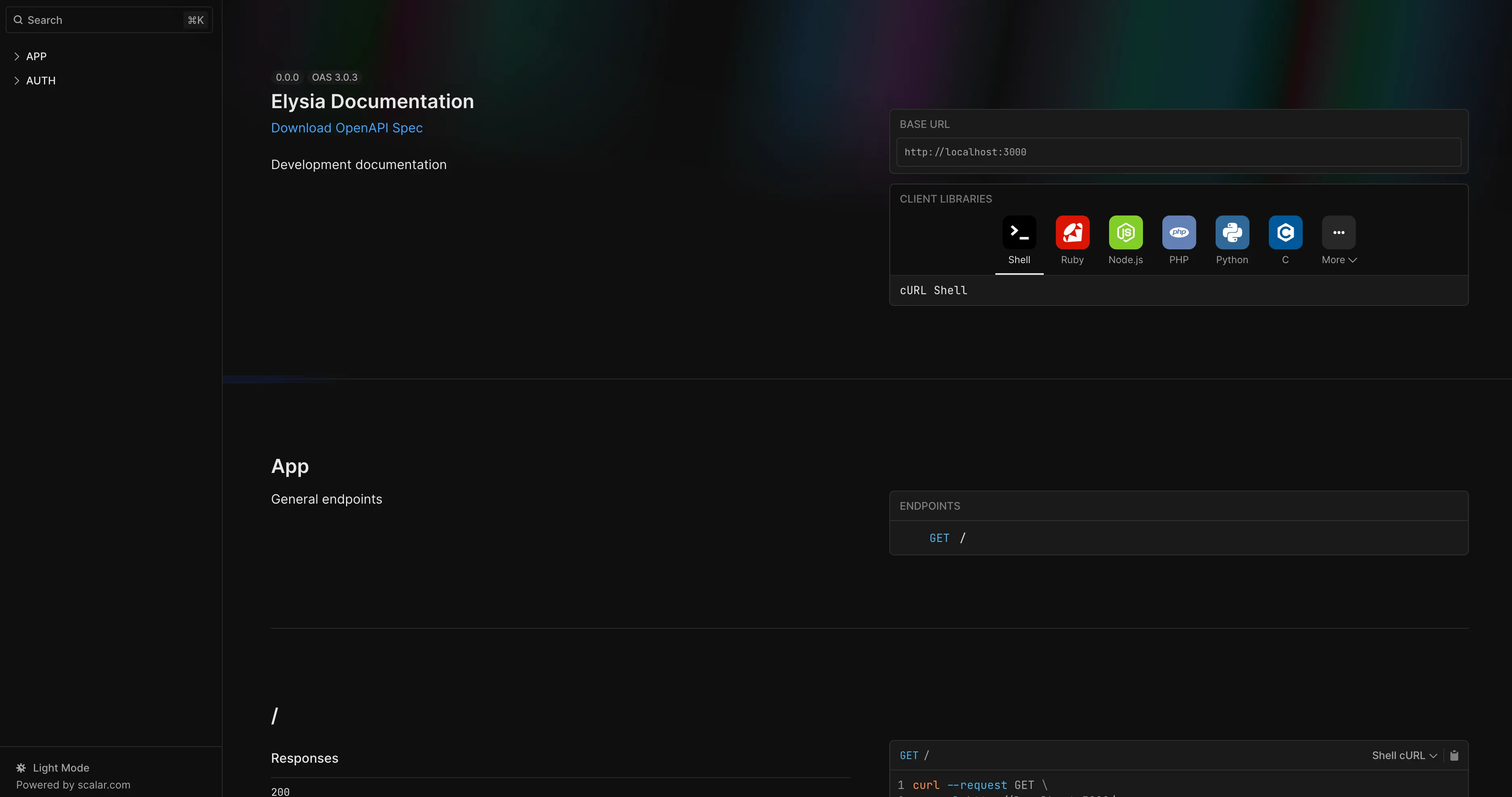
Tags group
Section titled “Tags group”Elysia may accept tags to add an entire instance or group of routes to a specific tag.
import { Elysia, t } from 'elysia'
new Elysia({    tags: ['user']})    .get('/user', 'user')    .get('/admin', 'admin')
Reference model
Section titled “Reference model”Registered models appear as named schema components in the generated OpenAPI document, and routes reference those components.
When routes share a schema, give it a name and reuse it. Start with the duplicated shape:
import { Elysia, t } from 'elysia'
new Elysia()    .post('/profile', {        body: t.Object({            username: t.String(),            displayName: t.String()        }),        response: t.Object({            username: t.String(),            displayName: t.String()        })    }, ({ body }) => body)
Extract it to a variable when that’s all you need:
import { Elysia, t } from 'elysia'
const Profile = t.Object({    username: t.String(),    displayName: t.String()})
new Elysia()    .post('/profile', {        body: Profile,        response: Profile    }, ({ body }) => body)
For named references and autocomplete across routes, register it with .model():
import { Elysia, t } from 'elysia'
new Elysia()    .model({        profile: t.Object({            username: t.String(),            displayName: t.String()        })    })    .post('/profile', {        body: 'profile',        response: 'profile'    }, ({ body }) => body)
Share models with a plugin
Section titled “Share models with a plugin”Put related models in a plugin when several controllers need them:
import { Elysia, t } from 'elysia'
export const profileModel = new Elysia()    .model({        profile: t.Object({            username: t.String(),            displayName: t.String()        })    })
Import the plugin and register it before the routes that use its models:
import { Elysia } from 'elysia'import { profileModel } from './profile.model'
new Elysia()    .use(profileModel)    .post('/profile', {        body: 'profile',        response: 'profile'    }, ({ body }) => body)
This keeps the model definitions together and makes their names available to routes and OpenAPI generation. The profile examples use public fields; a sign-in response shouldn’t echo a submitted password.
Multiple models
Section titled “Multiple models”Pass an object whose keys are model names and whose values are schemas:
import { Elysia, t } from 'elysia'
export const authModel = new Elysia()    .model({        number: t.Number(),        sign: t.Object({            username: t.String(),            password: t.String()        })    })
Naming convention
Section titled “Naming convention”Use a namespace when different parts of your app register similarly named models. Names such as admin.auth and user.auth make their ownership clear:
import { Elysia, t } from 'elysia'
export const adminModels = new Elysia()    .model({        'admin.auth': t.Object({            username: t.String(),            password: t.String()        })    })
export const userModels = new Elysia()    .model({        'user.auth': t.Object({            username: t.String(),            password: t.String()        })    })
Choose a convention with your team and avoid registering unrelated schemas under the same name.
Use a guard to apply the same detail to every route registered after it.
import { Elysia, t } from 'elysia'
new Elysia()    .guard({        detail: {            description: 'Require user to be logged in'        }    })    .get('/user', 'user')    .get('/admin', 'admin')
Change OpenAPI endpoint
Section titled “Change OpenAPI endpoint”You can change the OpenAPI endpoint by setting path in the plugin config.
import { Elysia } from 'elysia'import { openapi } from '@elysia/openapi'
new Elysia()    .use(        openapi({            path: '/v2/openapi'        })    )    .listen(3000)
Customize OpenAPI info
Section titled “Customize OpenAPI info”We can customize the OpenAPI information by setting documentation.info in the plugin config.
import { Elysia } from 'elysia'import { openapi } from '@elysia/openapi'
new Elysia()    .use(        openapi({            documentation: {                info: {                    title: 'Elysia Documentation',                    version: '1.0.0'                }            }        })    )    .listen(3000)
This can be useful for
- adding a title
- setting an API version
- adding a description explaining what our API is about
- explaining what tags are available, what each tag means
Security configuration
Section titled “Security configuration”To secure your API endpoints, you can define security schemes in the OpenAPI configuration. The example below documents Bearer Authentication (JWT) for your endpoints:
new Elysia().use(    openapi({        documentation: {            components: {                securitySchemes: {                    bearerAuth: {                        type: 'http',                        scheme: 'bearer',                        bearerFormat: 'JWT'                    }                }            }        }    }))
export const addressController = new Elysia({    prefix: '/address',    detail: {        tags: ['Address'],        security: [            {                bearerAuth: []            }        ]    }})
This documents bearer authentication for routes under /address; it does not validate a JWT or deny access. Add an authentication hook that verifies the token before the handler runs, and register addressController on the app whose OpenAPI plugin generates the document.