OpenTelemetry
Use the Elysia v2 OpenTelemetry plugin to record request spans and export them to a tracing backend. The examples target the v2 plugin API, not the older v1 integration.
bun add @elysia/opentelemetry@nextRegister the plugin on your application:
import { Elysia } from 'elysia'import { opentelemetry } from '@elysia/opentelemetry'
new Elysia()  .use(opentelemetry())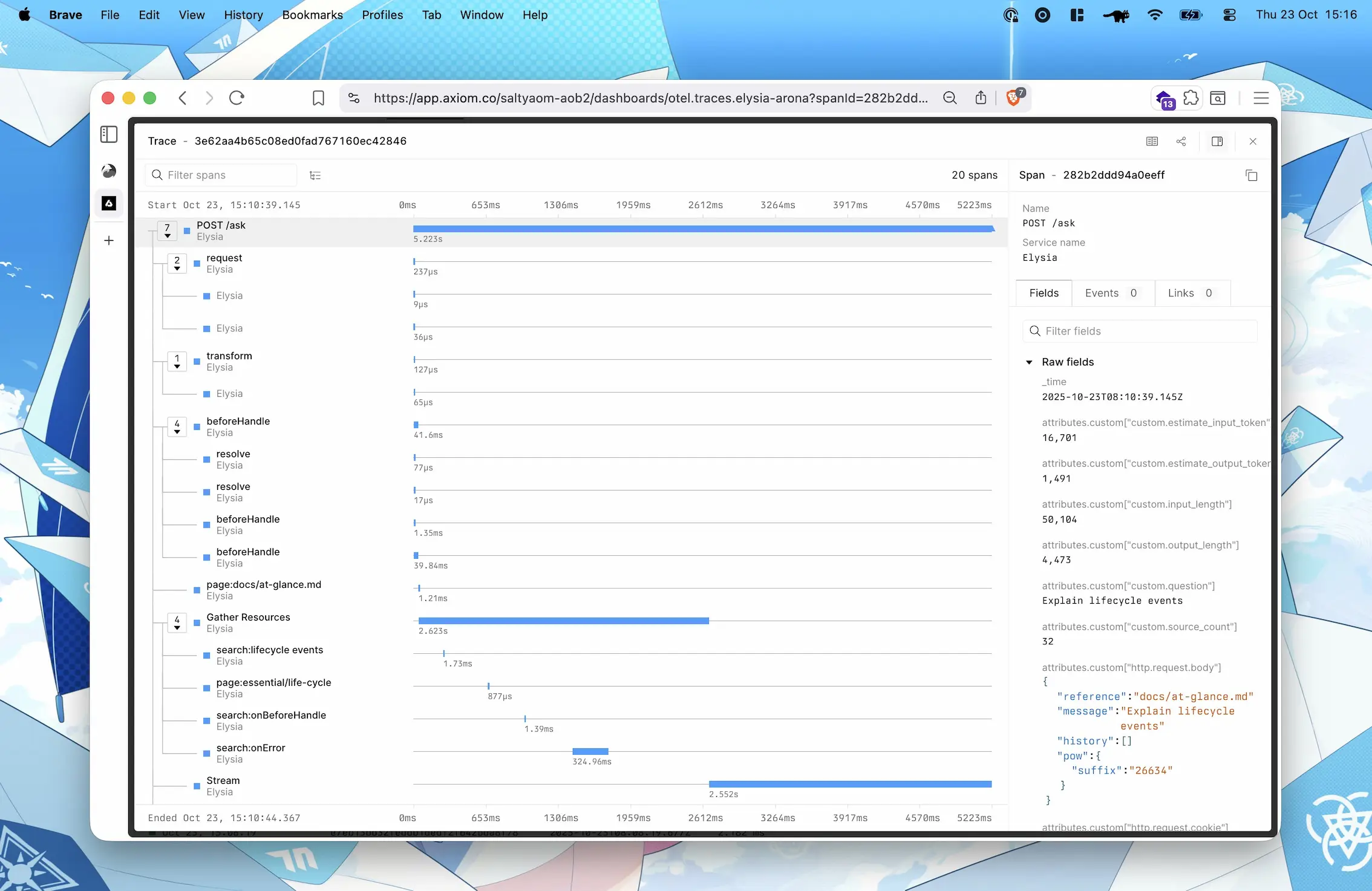
Why use OpenTelemetry with Elysia?
- One plugin registration
- Span name is the function name
- Grouping relevant lifecycle events together
- Wrap code to record a specific part
- Support for server-sent events and response streaming
- Compatible with any OpenTelemetry-compatible library
You may export telemetry data to Jaeger, Zipkin, New Relic, Axiom or any other OpenTelemetry-compatible backend.
Export OpenTelemetry data
Section titled “Export OpenTelemetry data”We can export OpenTelemetry data to any backend that supports the OpenTelemetry protocol.
Here’s an example of exporting telemetry to Axiom
import { Elysia } from 'elysia'import { opentelemetry } from '@elysia/opentelemetry'
import { BatchSpanProcessor } from '@opentelemetry/sdk-trace-node'import { OTLPTraceExporter } from '@opentelemetry/exporter-trace-otlp-proto'
new Elysia().use(  opentelemetry({    spanProcessors: [      new BatchSpanProcessor(        new OTLPTraceExporter({          url: 'https://api.axiom.co/v1/traces',          headers: {            Authorization: `Bearer ${Bun.env.AXIOM_TOKEN}`,            'X-Axiom-Dataset': Bun.env.AXIOM_DATASET          }        })      )    ]  }))
OpenTelemetry SDK
Section titled “OpenTelemetry SDK”Elysia OpenTelemetry is for applying OpenTelemetry to an Elysia server only.
You may use the OpenTelemetry SDK normally. If a span runs under Elysia’s request span, it will automatically appear in the Elysia trace.
Use the plugin’s getTracer and record utilities when you want to add spans around your own work. In the next example, db is your application’s database client.
import { Elysia } from 'elysia'import { record } from '@elysia/opentelemetry'
export const plugin = new Elysia().get('/users', () => {  return record('database.query', () => {    return db.query('SELECT * FROM users')  })})
Record utility
Section titled “Record utility”record is equivalent to OpenTelemetry’s startActiveSpan but it will handle auto-closing and capture exceptions automatically.
You may think of record as a label for your code that will be shown in the trace.
Prepare your codebase for observability
Section titled “Prepare your codebase for observability”Elysia OpenTelemetry groups lifecycle work and uses each hook’s function name as its span name. Here, getProfile is your application’s profile lookup function.
It’s a good time to name your function.
If your hook handler is an arrow function, you may refactor it to a named function to understand the trace better. Otherwise, your trace span will be named as anonymous.
const bad = new Elysia()  // Note: span name will be anonymous  .derive(async ({ cookie: { session } }) => {    return {      user: await getProfile(session.value)    }  })
const good = new Elysia()  // Yes span name will be loadProfile  .derive(async function loadProfile({ cookie: { session } }) {    return {      user: await getProfile(session.value)    }  })
getCurrentSpan
Section titled “getCurrentSpan”getCurrentSpan is a utility to get the current span of the current request when you are outside of the handler.
import { getCurrentSpan } from '@elysia/opentelemetry'
function utility() {  const span = getCurrentSpan()  span?.setAttributes({    'custom.attribute': 'value'  })}
This uses the active OpenTelemetry context. Outside an active request or span it can return undefined, so check before using it.
setAttributes
Section titled “setAttributes”setAttributes is a utility to set attributes to the current span.
import { setAttributes } from '@elysia/opentelemetry'
function utility() {  setAttributes({    'custom.attribute': 'value'  })}
This is syntax sugar for getCurrentSpan()?.setAttributes, so it does nothing outside an active span.
Configuration
Section titled “Configuration”See opentelemetry plugin for configuration options and definitions.
Instrumentations
Section titled “Instrumentations”Many instrumentation libraries require that the SDK MUST run before importing the module.
For example, to use PgInstrumentation, the OpenTelemetry SDK must run before importing the pg module.
To achieve this in Bun, we can
- Separate an OpenTelemetry setup into a different file
- create
bunfig.tomlto preload the OpenTelemetry setup file
Let’s create a new file in src/instrumentation.ts
import { opentelemetry } from '@elysia/opentelemetry'import { PgInstrumentation } from '@opentelemetry/instrumentation-pg'
export const instrumentation = opentelemetry({  instrumentations: [new PgInstrumentation()]})
Then we can apply this instrumentation plugin into our main instance in src/index.ts
import { Elysia } from 'elysia'import { instrumentation } from './instrumentation.ts'
new Elysia().use(instrumentation).listen(3000)
Then create a bunfig.toml with the following:
bunfig.toml
preload = ["./src/instrumentation.ts"]This will tell Bun to load and set up instrumentation before running the src/index.ts allowing OpenTelemetry to do its setup as needed.
Deploying to production
Section titled “Deploying to production”If you are using bun build or other bundlers, OpenTelemetry relies on monkey-patching node_modules/<library>. To make instrumentation work properly, we need to specify libraries to be instrumented as external modules to exclude them from being bundled.
For example, if you are using @opentelemetry/instrumentation-pg to instrument the pg library, we need to exclude pg from being bundled and make sure that it is importing node_modules/pg.
To make this work, we may specify pg as an external module with --external pg
bun build --compile --external pg --outfile server src/index.tsThis tells Bun not to bundle pg into the final output file. The library will be imported from the node_modules directory at runtime. So on a production server, you must also keep the node_modules directory.
It’s recommended to specify packages that should be available in a production server as dependencies in package.json and use bun install --production to install only production dependencies.
Keep every package left external in dependencies:
{ "dependencies": { "pg": "^8.15.6" }, "devDependencies": { "@elysia/opentelemetry": "2.0.0-beta.2", "@opentelemetry/instrumentation-pg": "^0.52.0", "@types/pg": "^8.11.14", "elysia": "2.0.0-beta.32" }}Then, after running a build command, run this on a production server:
bun install --productionIf the node_modules directory still includes development dependencies, you may remove the node_modules directory and reinstall production dependencies again.