From Hono to Elysia
This guide is for Hono users who want to see the differences from Elysia including syntax, and how to migrate your application from Hono to Elysia by example.
Hono is a fast and lightweight web framework built on Web Standard. It has broad compatibility with multiple runtimes like Deno, Bun, Cloudflare Workers, and Node.js.
Elysia is an ergonomic web framework. Designed for developer experience with a focus on sound type safety and performance. Not limited to Bun, Elysia also supports multiple runtimes like Node.js, and Cloudflare Workers.
When to use
Section titled “When to use”Here’s a TLDR comparison between Hono and Elysia to help you decide:
Hono
- Originally built for Cloudflare Workers, more integrated with the Cloudflare ecosystem
- Supports multiple runtimes with Web Standard, including Node.js and Bun
- Lightweight and minimalistic, suitable for edge environments
- Supports OpenAPI but requires additional effort to describe the specification
- Prefers a simple, linear middleware-based approach
- Type safety is better than most frameworks, but not sound in some areas
- Somewhat similar to Express, Koa in terms of middleware, plugin style
Elysia
- Originally built for native Bun, uses most of Bun’s features to the fullest extent
- Supports multiple runtimes with Web Standard, including Node.js and Cloudflare Workers
- Better performance. Geared toward long-running servers via JIT.
- Better OpenAPI support with a seamless experience, especially with OpenAPI Type Gen
- Prefers an event-based lifecycle approach for better control over the request pipeline
- Sound type safety across the board, including middleware, and error handling
- Somewhat similar to Fastify in terms of middleware, encapsulation, and plugin style
There is a huge difference between being compatible and specifically built for something.
If you decide to use Elysia on Cloudflare Workers, you might miss some of the Cloudflare-specific features that Hono provides out of the box. Similarly, if you use Hono on Bun, you might not get the best performance possible compared to using Elysia.
Performance
Section titled “Performance”Elysia has historically benchmarked faster than Hono thanks to static code analysis.
This comparison uses a historical TechEmpower Round 23 result from 2025-02-24 for JSON serialization. These are the recorded framework/runtime combinations, not measurements of Elysia v2.
| Framework | Requests per second |
|---|---|
| Elysia | 1,837,294 |
| Hono | 740,451 |
Routing
Section titled “Routing”Hono and Elysia have similar routing syntax, using app.get() and app.post() methods to define routes and similar path parameter syntax.
Both use a single Context parameter to handle requests and responses, and return a response directly.
import { Hono } from 'hono'
const app = new Hono()
app.get('/', (c) => {    return c.text('Hello World')})
app.post('/id/:id', (c) => {  c.status(201)    return c.text(c.req.param('id'))})
export default app
Hono uses helpers
c.textandc.jsonto return a response
import { Elysia } from 'elysia'
const app = new Elysia()    .get('/', 'Hello World')    .post(      '/id/:id',       ({ status, params: { id } }) => {          return status(201, id)        }    )    .listen(3000)
Elysia uses a single
contextand returns the response directly
While Hono uses c.text and c.json to wrap a response, Elysia maps a value to a response automatically.
There is a slight difference in style guide. Elysia recommends usage of method chaining and object destructuring.
Hono port allocation depends on the runtime and adapter while Elysia uses a single listen method to start the server.
Handler
Section titled “Handler”Hono uses a function to parse query, header, and body manually while Elysia automatically parses properties.
import { Hono } from 'hono'
const app = new Hono()
app.post('/user', async (c) => {  const limit = c.req.query('limit')    const { name } = await c.req.json()    const auth = c.req.header('authorization')
    return c.json({ limit, name, auth })})
Hono reads JSON with
c.req.json()and exposes query and header accessors onc.req.
import { Elysia, t } from 'elysia'
const app = new Elysia()  .post('/user', { body: t.Object({ name: t.String() }) }, (ctx) => {      const limit = ctx.query.limit      const name = ctx.body.name      const auth = ctx.headers.authorization
      return { limit, name, auth }  })
Elysia uses static code analysis to analyze what to parse
Elysia uses static code analysis to determine what to parse, and only parses the required properties.
This is useful for performance and type safety.
Subrouter
Section titled “Subrouter”Both can inherit another instance as a router, but Elysia treats every instance as a component which can be used as a subrouter.
import { Hono } from 'hono'
const subRouter = new Hono()
subRouter.get('/user', (c) => {  return c.text('Hello User')})
const app = new Hono()
app.route('/api', subRouter)
Hono requires a prefix to separate the subrouter
import { Elysia } from 'elysia'
const subRouter = new Elysia({ prefix: '/api' })  .get('/user', 'Hello User')
const app = new Elysia()  .use(subRouter)
Elysia uses an optional constructor prefix to define one
While Hono requires a prefix to separate the subrouter, Elysia doesn’t require a prefix to separate the subrouter.
Validation
Section titled “Validation”While Hono supports various validators via external packages, Elysia has built-in validation using TypeBox, and supports Standard Schema out of the box allowing you to use your favorite library like Zod, Valibot, ArkType, Effect Schema and so on without additional libraries. Elysia also offers seamless integration with OpenAPI, and type inference behind the scenes.
import { Hono } from 'hono'import { zValidator } from '@hono/zod-validator'import { z } from 'zod'
const app = new Hono()
app.patch(  '/user/:id',  zValidator(    'param',    z.object({      id: z.coerce.number()    })  ),  zValidator(    'json',    z.object({      name: z.string()    })  ),  (c) => {    return c.json({      params: c.req.valid('param'),      body: c.req.valid('json')    })  })
Hono uses a pipe-based approach
import { Elysia, t } from 'elysia'
const app = new Elysia() .patch('/user/:id', { params: t.Object({ id: t.Number() }), body: t.Object({ name: t.String() }) }, ({ params, body }) => ({ params, body }))import { Elysia } from 'elysia'import { z } from 'zod'
const app = new Elysia() .patch('/user/:id', { params: z.object({ id: z.coerce.number() }), body: z.object({ name: z.string() }) }, ({ params, body }) => ({ params, body }))import { Elysia } from 'elysia'import * as v from 'valibot'
const app = new Elysia() .patch('/user/:id', { params: v.object({ id: v.pipe(v.string(), v.transform(Number), v.number()) }), body: v.object({ name: v.string() }) }, ({ params, body }) => ({ params, body }))Elysia uses TypeBox for validation, and coerces types automatically, while supporting various validation libraries like Zod and Valibot with the same syntax as well.
Both offer type inference from schema to context automatically.
File upload
Section titled “File upload”Both Hono and Elysia use Web Standard API to handle file upload, and both use file-type to validate mimetype. Elysia registers it once and validates declaratively.
import { Hono } from 'hono'import { z } from 'zod'import { zValidator } from '@hono/zod-validator'
import { fileTypeFromBlob } from 'file-type'
const app = new Hono()
app.post(  '/upload',  zValidator(    'form',    z.object({      file: z.instanceof(File)    })  ),  async (c) => {    const body = c.req.valid('form')
    const type = await fileTypeFromBlob(body.file)    if (!type || !type.mime.startsWith('image/')) {      c.status(422)      return c.text('File is not a valid image')    }
    return new Response(body.file)  })
Hono calls
file-typein the handler to validate mimetype
import { Elysia, t, setFileTypeDetector } from 'elysia'import { fileTypeFromBlob } from 'file-type'
setFileTypeDetector(fileTypeFromBlob)
const app = new Elysia()  .post('/upload', {    body: t.Object({      file: t.File({        type: 'image/*'      })    })  }, ({ body }) => body.file)
Elysia registers
file-typeonce and validates mimetype declaratively
As Web Standard API doesn’t validate mimetype, it is a security risk to trust content-type provided by the client so both use file-type to inspect the file’s bytes. Elysia registers the detector once with setFileTypeDetector, then checks the type declaratively with t.File({ type }). The detector is required: without it, every upload checked against type fails validation.
Middleware
Section titled “Middleware”Hono middleware uses a single queue-based order similar to Express while Elysia gives you more granular control using an event-based lifecycle.
Elysia exposes stages of the request lifecycle:
| Stage | Purpose |
|---|---|
| Request | Inspect the incoming request before parsing |
| Parse | Decode the request body |
| Transform and validation | Normalize and validate request inputs |
| Before handle | Derive request values or return an early response |
| Handler | Produce the route response |
| After handle and map response | Adjust and serialize the response |
| After response | Run work after the response is sent |
The error hook handles failures in this pipeline.
While Hono has a single flow for the request pipeline in order, Elysia can intercept each event in a request pipeline.
import { Hono } from 'hono'
const app = new Hono()
// Global middlewareapp.use(async (c, next) => {  console.log(`${c.req.method} ${c.req.url}`)
  await next()})
app.get(  '/protected',  // Route-specific middleware  async (c, next) => {      const token = c.req.header('authorization')
      if (!token) {      c.status(401)         return c.text('Unauthorized')    }
      await next()  },  (c) => c.text('Protected route'))
Hono uses a single queue-based order for middleware which executes in order
import { Elysia } from 'elysia'
const app = new Elysia()  // Global middleware  .onRequest(({ request }) => {    console.log(request.method, new URL(request.url).pathname)  })  // Route-specific middleware  .get('/protected', {    beforeHandle({ status, headers }) {        if (!headers.authorization)           return status(401)    }  }, () => 'protected')
Elysia uses a specific event interceptor for each point in the request pipeline
While Hono has a next function to call the next middleware, Elysia does not have one.
Sound type safety
Section titled “Sound type safety”Elysia is designed to provide sound type safety.
For example, derive adds request-specific context with inferred types. In v2 it also takes over the validated-context role previously served by resolve.
import { Hono } from 'hono'import { createMiddleware } from 'hono/factory'
const app = new Hono()
const getVersion = createMiddleware(async (c, next) => {  c.set('version', 2)
  await next()})
app.use(getVersion)
app.get('/version', getVersion, (c) => {  return c.text(c.get('version') + '')})
const authenticate = createMiddleware(async (c, next) => {  const token = c.req.header('authorization')
  if (!token) {    c.status(401)    return c.text('Unauthorized')  }
  c.set('token', token.split(' ')[1])
  await next()})
app.post('/user', authenticate, async (c) => {  c.get('version')
  return c.text(c.get('token'))})
Hono uses middleware to extend the context, but is not type safe
import { Elysia } from 'elysia'
const app = new Elysia()  .decorate('version', 2)  .get('/version', ({ version }) => version)  .derive(({ status, headers: { authorization } }) => {    if(!authorization?.startsWith('Bearer '))      return status(401)
    return {      token: authorization.split(' ')[1]    }  })  // {  token: string, version: number }  .get('/token', ({ token, version }) => {    return token  })
Elysia uses
decorateto extend the context, andderiveto add custom properties to the context
The Bearer prefix check stands in for real credential verification. A header or Bearer prefix check alone is not authentication.
While Hono can use declare module to extend the ContextVariableMap interface, it is globally available and doesn’t have sound type safety, and doesn’t guarantee that the property is available in all request handlers.
declare module 'hono' { interface ContextVariableMap { version: number token: string }}This is required for the above Hono example to work, which doesn’t offer sound type safety
Middleware parameter
Section titled “Middleware parameter”Hono uses a callback function to define reusable route-specific middleware, while Elysia uses macro to define a custom hook.
import { findUser } from './users'import { Hono } from 'hono'import { createMiddleware } from 'hono/factory'
const app = new Hono()
const role = (role: 'user' | 'admin') => createMiddleware(async (c, next) => {  const user = findUser(c.req.header('Authorization'))
  if(!user || user.role !== role) {    c.status(401)    return c.text('Unauthorized')  }
  c.set('user', user)
  await next()})
app.get('/user/:id', role('admin'), (c) => {  // Error: No overload matches this call.  return c.json(c.get('user'))})
Hono uses a callback to return
createMiddlewareto create reusable middleware, but is not type safe
import { Elysia } from 'elysia'import { findUser } from './users'
const app = new Elysia()  .macro({    role: (role: 'user' | 'admin') => ({      derive({ status, headers: { authorization } }) {        const user = findUser(authorization)
        if (!user || user.role !== role)          return status(401)
        return {          user        }      }    })  })  // { user: User }  .get('/token', {    role: 'admin'  }, ({ user }) => user)
Elysia uses macro to pass custom arguments to custom middleware
Here, findUser is application code that verifies the supplied credential and returns a user with a role, or no user when verification fails. A header or Bearer prefix check alone is not authentication.
Error handling
Section titled “Error handling”Hono provides an onError function which applies to all routes while Elysia provides more granular control over error handling.
import { Hono } from 'hono'
const app = new Hono()
class CustomError extends Error {  constructor(message: string) {    super(message)    this.name = 'CustomError'  }}
// global error handlerapp.onError((error, c) => {  if(error instanceof CustomError) {    c.status(500)
    return c.json({      message: 'Something went wrong!',      error    })  }
  return c.text('Internal Server Error', 500)})
// This route throws an error handled by onError.app.get('/error', () => {  throw new CustomError('oh uh')})
Hono uses the
onErrorfunction to handle errors, a single error handler for all routes
import { Elysia } from 'elysia'
class CustomError extends Error {    status = 500}
const app = new Elysia()    .onError(CustomError, ({ error, status }) =>        status(500, { message: 'Something went wrong!', detail: error.message })    )    .get('/error', () => {        throw new CustomError('oh uh')    })    .get('/local-error', {        error({ error, status }) {            if (error instanceof RangeError)                return status(500, { message: 'Only for this route!' })        }    }, () => {        throw new RangeError('outside the allowed range')    })
Elysia provides more granular control over error handling, and scoping mechanisms
While Hono offers onError per app, Elysia provides:
- Both global and route-specific error handlers
- The
statushelper for returning a response with an HTTP status - Errors with a
status(orHTTPError) map to their HTTP status
The /error route uses the registered CustomError handler. The /local-error route handles a different error locally. Error hooks run in the order they’re registered, and the first one that returns a value sends the response. Hooks registered on the app before a route run before that route’s own error hook, so the route hook can’t override them.
Elysia infers the registered error type in its class-specific handler.
Encapsulation
Section titled “Encapsulation”Hono encapsulates plugin side-effects, while Elysia gives you control over side-effects of a plugin via an explicit scoping mechanism and order-of-code.
import { Hono } from 'hono'
const subRouter = new Hono()
subRouter.use(async (c, next) => {  if (!c.req.header('authorization')?.startsWith('Bearer '))    return c.text('Unauthorized', 401)
  await next()})
subRouter.get('/user', (c) => {  return c.text('Hello User')})
const app = new Hono()
app.route('/api', subRouter)// doesn't have side-effect from subRouterapp.get('/side-effect', (c) => c.text('hi'))
Hono encapsulates side-effects of a plugin
import { Elysia } from 'elysia'
const subRouter = new Elysia()  .onBeforeHandle(({ status, headers: { authorization } }) => {    if(!authorization?.startsWith('Bearer '))      return status(401)     })
const app = new Elysia()    .get('/', 'Hello World')    .use(subRouter)    // doesn't have side-effect from subRouter    .get('/side-effect', () => 'hi')
Elysia encapsulates side-effects of a plugin unless explicitly stated
Both have an encapsulation mechanism for plugins to prevent side-effects.
However, Elysia can explicitly state which plugin should have side-effects by declaring plugin scope, while Hono keeps middleware on the router it’s registered on.
import { Elysia } from 'elysia'
const subRouter = new Elysia()  .onBeforeHandle(({ status, headers: { authorization } }) => {    if(!authorization?.startsWith('Bearer '))      return status(401)     })  // Scoped to parent instance but not beyond  .as('plugin') // [!code ++]
const app = new Elysia()    .get('/', 'Hello World')    .use(subRouter)    // [!code ++]    // now has side-effects from subRouter    .get('/side-effect', () => 'hi')
Elysia offers 3 types of scoping mechanisms:
- local - Apply to the current instance and its descendants (default)
- plugin - Share side-effects with the parent instance but not beyond
- global - Share through all parent instances
As Hono can’t share a sub-router’s middleware with its parent, the example below creates a function for each hook and appends it manually.
However, this can cause duplicated side-effects if not handled carefully.
import { Hono } from 'hono'import { createMiddleware } from 'hono/factory'
const middleware = createMiddleware(async (c, next) => {  console.log('called')
  await next()})
const app = new Hono()const subRouter = new Hono()
app.use(middleware)app.get('/main', (c) => c.text('Hello from main!'))
subRouter.use(middleware)
// This would log twicesubRouter.get('/sub', (c) => c.text('Hello from sub router!'))
app.route('/sub', subRouter)
export default app
In this scenario, Elysia offers a plugin deduplication mechanism to prevent duplicated side-effects.
import { Elysia } from 'elysia'
const subRouter = new Elysia({ name: 'subRouter' }) // [!code ++]  .onBeforeHandle(({ status, headers: { authorization } }) => {    if(!authorization?.startsWith('Bearer '))      return status(401)     })  .as('plugin')
const app = new Elysia()  .get('/', 'Hello World')  .use(subRouter)  .use(subRouter) // [!code ++]  .use(subRouter) // [!code ++]  .use(subRouter) // [!code ++]  // side-effect only called once  .get('/side-effect', () => 'hi')
By using a unique name, Elysia will apply the plugin only once, and will not cause duplicated side-effects.
Cookie
Section titled “Cookie”Hono has built-in cookie utility functions under hono/cookie, while Elysia uses a signal-based approach to handle cookies.
import { Hono } from 'hono'import { getSignedCookie, setSignedCookie } from 'hono/cookie'
const app = new Hono()
app.get('/', async (c) => {  const name = await getSignedCookie(c, 'secret', 'name')
  await setSignedCookie(    c,    'name',    'value',    'secret',    {      maxAge: 1000,    }  )})
Hono uses utility functions to handle cookies
import { Elysia, t } from 'elysia'
const app = new Elysia({    cookie: {        secrets: 'replace-with-a-private-secret',        sign: ['name']    }})    .get('/', {        cookie: t.Cookie({ name: t.Optional(t.String()) })    }, ({ cookie: { name } }) => {        const previous = name.value        name.set({            value: 'value',            maxAge: 60 * 60 * 24,            httpOnly: true,            secure: true,            sameSite: 'lax'        })        return previous ?? 'unset'    })
Elysia verifies and signs the configured cookies automatically. Cookie
maxAgeis in seconds; replace the example secret with a private value and serve secure cookies over HTTPS.
OpenAPI
Section titled “OpenAPI”Hono requires additional effort to describe the specification, while Elysia seamlessly integrates the specification into the schema.
import { Hono } from 'hono'import { describeRoute, openAPISpecs } from 'hono-openapi'import { resolver, validator as zodValidator } from 'hono-openapi/zod'import { swaggerUI } from '@hono/swagger-ui'
import { z } from '@hono/zod-openapi'
const app = new Hono()
const model = z.array(  z.object({    name: z.string().openapi({      description: 'first name only'    }),    age: z.number()  }))
const detail = await resolver(model).builder()
console.log(detail)
app.post(  '/',  zodValidator('json', model),  describeRoute({    validateResponse: true,    summary: 'Create user',    requestBody: {      content: {        'application/json': { schema: detail.schema }      }    },    responses: {      201: {        description: 'User created',        content: {          'application/json': { schema: resolver(model) }        }      }    }  }),  (c) => {    c.status(201)    return c.json(c.req.valid('json'))  })
app.get('/ui', swaggerUI({ url: '/doc' }))
app.get(  '/doc',  openAPISpecs(app, {    documentation: {      info: {        title: 'Hono API',        version: '1.0.0',        description: 'Greeting API'      },      components: {        ...detail.components      }    }  }))
export default app
Hono requires additional effort to describe the specification
import { Elysia, t } from 'elysia'import { openapi } from '@elysia/openapi' // [!code ++]
const app = new Elysia()  .use(openapi()) // [!code ++]  .model({    user: t.Array(      t.Object({        name: t.String(),        age: t.Number()      })    )  })  .post('/users', {    body: 'user',    response: {      201: 'user'    },    detail: {      summary: 'Create user'    }  }, ({ body, status }) => status(201, body))
Elysia seamlessly integrates the specification into the schema
Hono has a separate function to describe route specification, validation, and requires some effort to set up properly.
Elysia uses the schema you provide to generate the OpenAPI specification, and validates the request/response, and infers types automatically all from a single source of truth.
Elysia also appends the schema registered in model to the OpenAPI spec, allowing you to reference the model in a dedicated section in Swagger or Scalar UI while Hono inlines the schema to the route.
Testing
Section titled “Testing”Both are built on top of Web Standard API allowing them to be used with any testing library.
import { Hono } from 'hono'import { describe, it, expect } from 'vitest'
const app = new Hono()  .get('/', (c) => c.text('Hello World'))
describe('GET /', () => {  it('should return Hello World', async () => {    const res = await app.request('/')
    expect(res.status).toBe(200)    expect(await res.text()).toBe('Hello World')  })})
Hono has a built-in
requestmethod to run the request
import { Elysia } from 'elysia'import { describe, it, expect } from 'vitest'
const app = new Elysia()  .get('/', 'Hello World')
describe('GET /', () => {  it('should return Hello World', async () => {    const res = await app.handle(      new Request('http://localhost')    )
    expect(res.status).toBe(200)    expect(await res.text()).toBe('Hello World')  })})
Elysia uses Web Standard API to handle requests and responses
Alternatively, Elysia also offers a helper library called Eden for End-to-end type safety, allowing us to test with auto-completion, and full type safety.
import { Elysia } from 'elysia'import { treaty } from '@elysia/eden'import { describe, expect, it } from 'bun:test'
const app = new Elysia().get('/hello', 'Hello World')const api = treaty(app)
describe('GET /', () => {  it('should return Hello World', async () => {    const { data, error, status } = await api.hello.get()
    expect(status).toBe(200)    expect(data).toBe('Hello World')  })})
End-to-end type safety
Section titled “End-to-end type safety”Both offer end-to-end type safety. However, Hono doesn’t seem to offer type-safe error handling based on status code.
import { Hono } from 'hono'import { hc } from 'hono/client'import { z } from 'zod'import { zValidator } from '@hono/zod-validator'
const app = new Hono()  .post(    '/mirror',    zValidator(      'json',      z.object({        message: z.string()      })    ),    (c) => c.json(c.req.valid('json'))  )
const client = hc<typeof app>('/')
const response = await client.mirror.$post({  json: {    message: 'Hello, world!'  }})
// { message: string }const data = await response.json()
Hono uses
hcto run the request, and offers end-to-end type safety
import { Elysia, t } from 'elysia'import { treaty } from '@elysia/eden'
const app = new Elysia()  .post('/mirror', {    body: t.Object({      message: t.String()    })  }, ({ body }) => body)
const api = treaty(app)
const { data, error } = await api.mirror.post({  message: 'Hello World'})
if (error)  // error.status: 422  // error.value: { type: 'validation', title: 'Validation Error', status: 422, on: 'body', detail, errors: [...] }  throw error
// { message: 'Hello World' }console.log(data)
Elysia uses
treatyto run the request, and offers end-to-end type safety
While both offer end-to-end type safety, Elysia offers more type-safe error handling based on status code, while Hono doesn’t.
The following type-inference timings were recorded for the versions and schema in these screenshots. They are historical observations, not a benchmark of current releases.
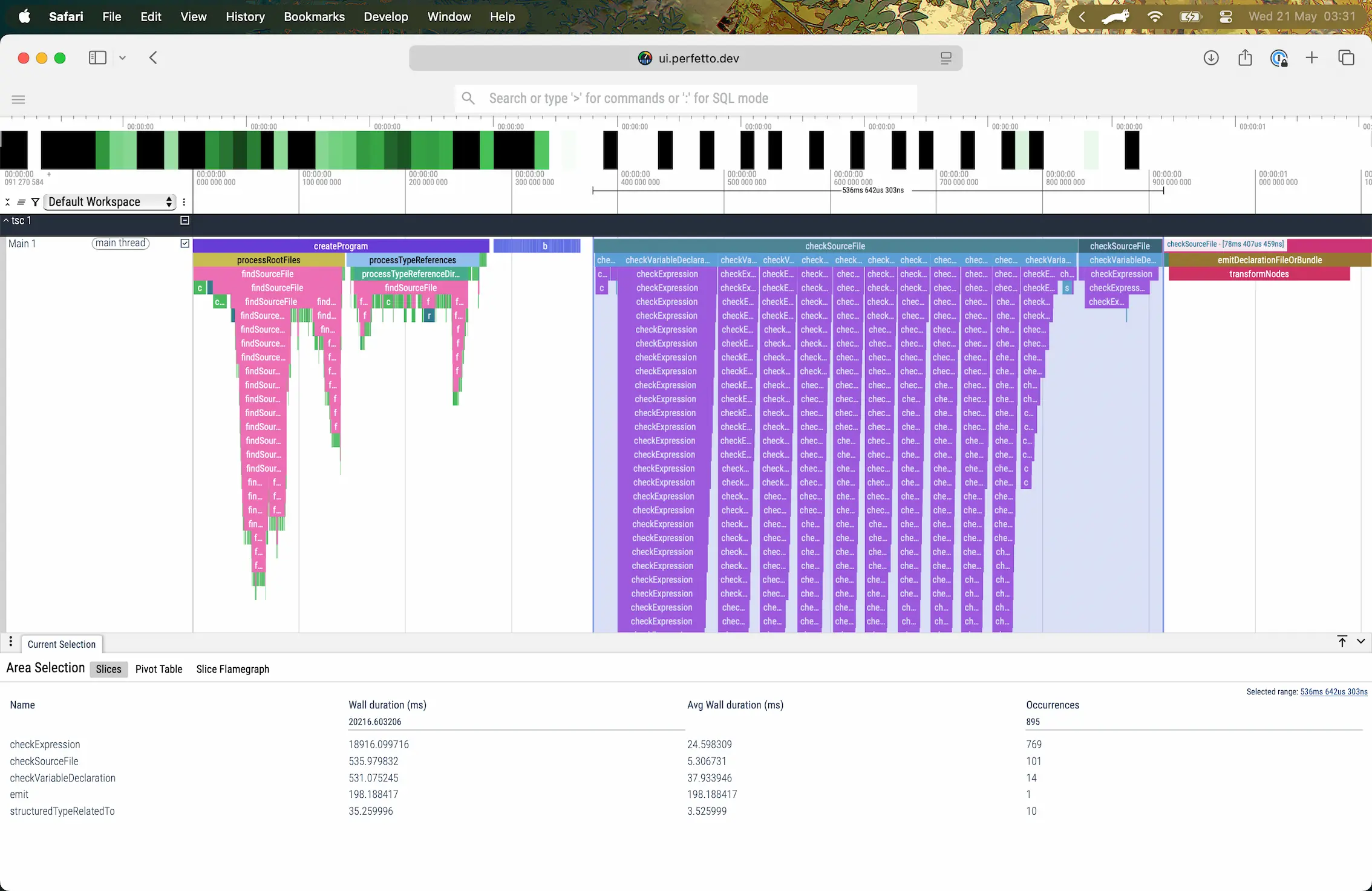
Elysia takes 536ms to infer both Elysia, and Eden
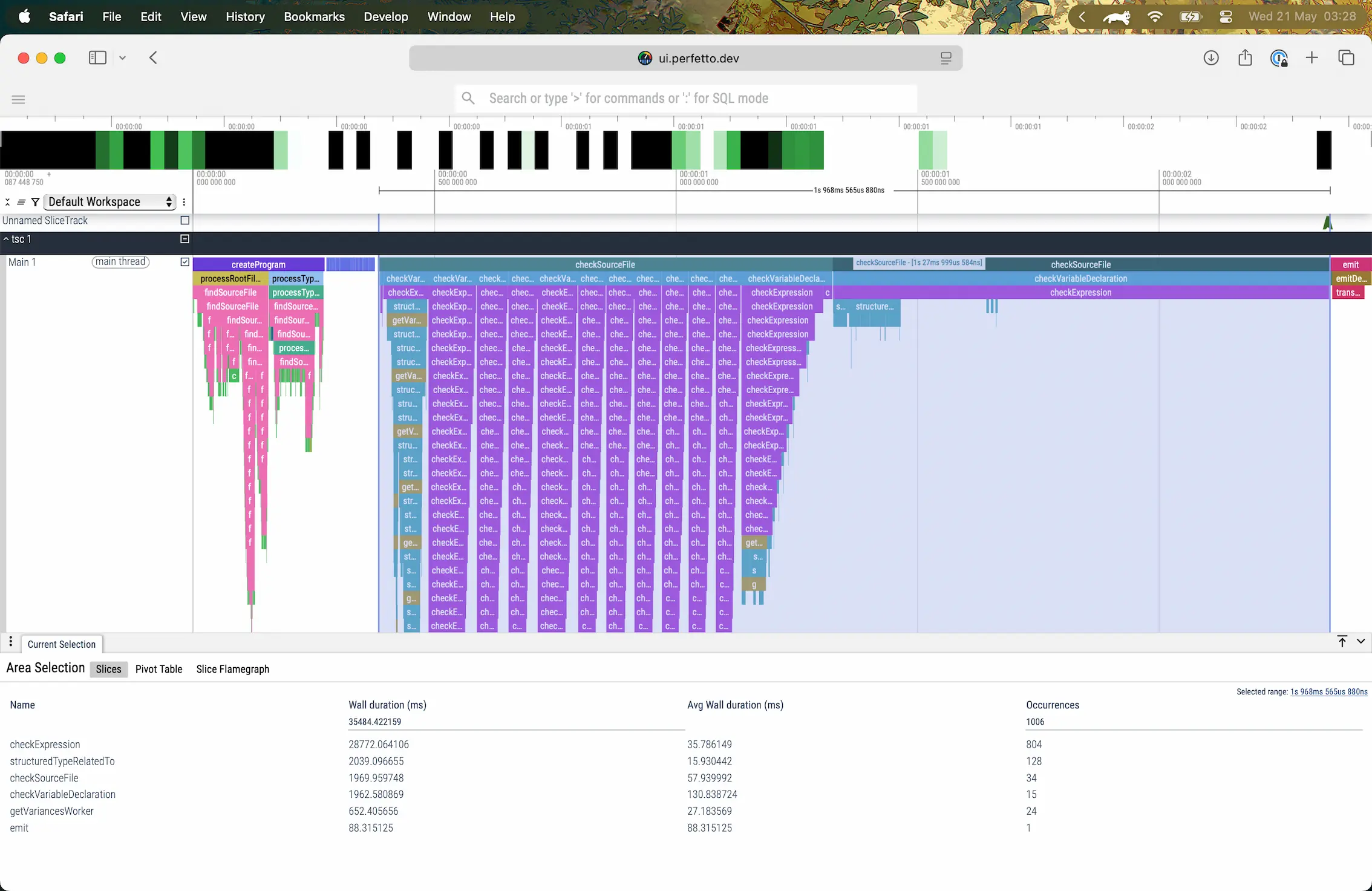
Hono takes 1.27s to infer both Hono, and HC with error (aborted)
The 1.27 seconds doesn’t reflect the entire duration of the inference, but a duration from the start until it was aborted by the error “Type instantiation is excessively deep and possibly infinite.” which happens when the schemas are too large.
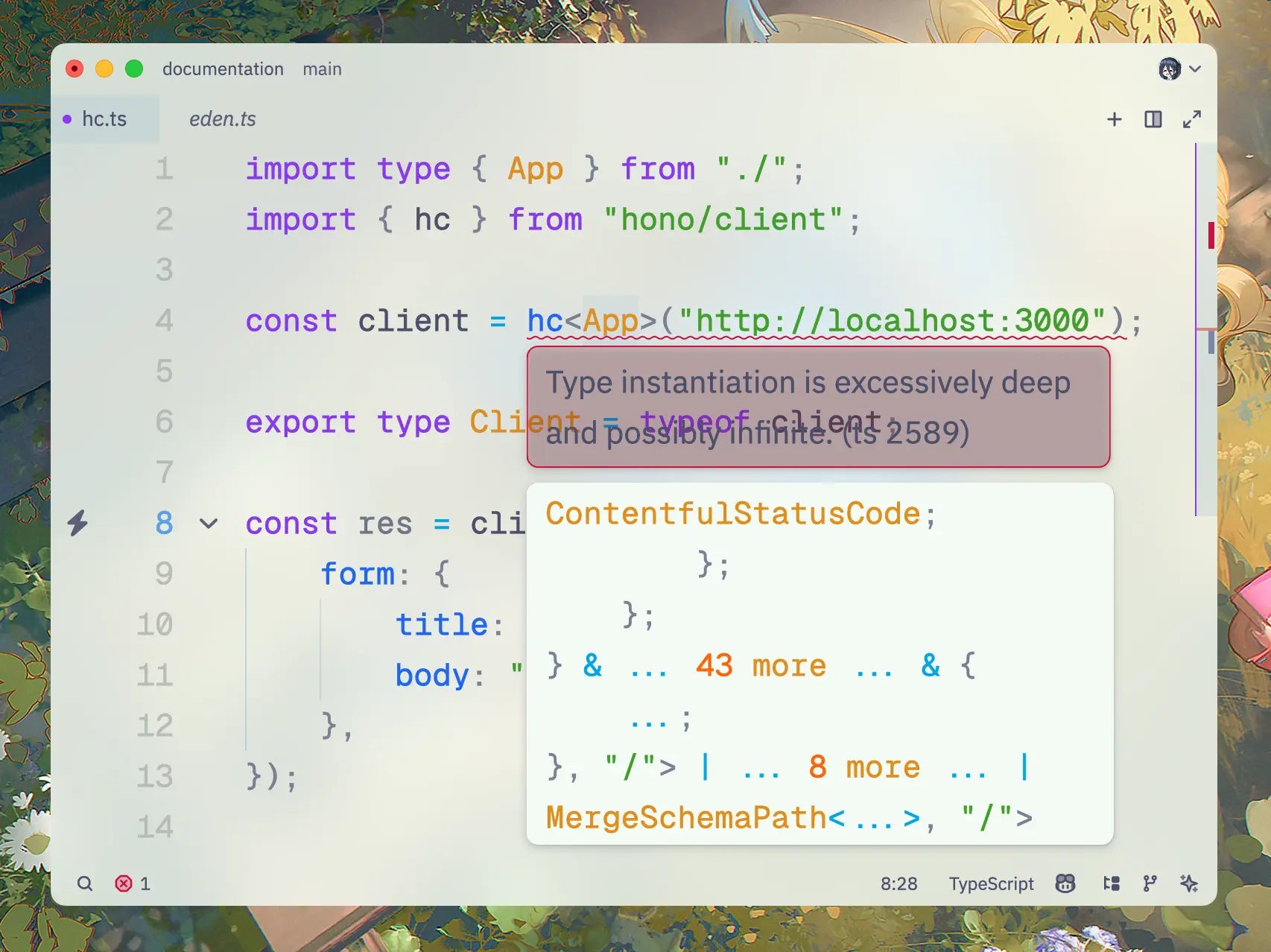
Hono HC showing excessively deep error
In that test, Hono HC reached the TypeScript instantiation limit with over 100 routes and complex body and response schemas. This is not a general route limit; compiler versions, schema structure, and client types affect the result.
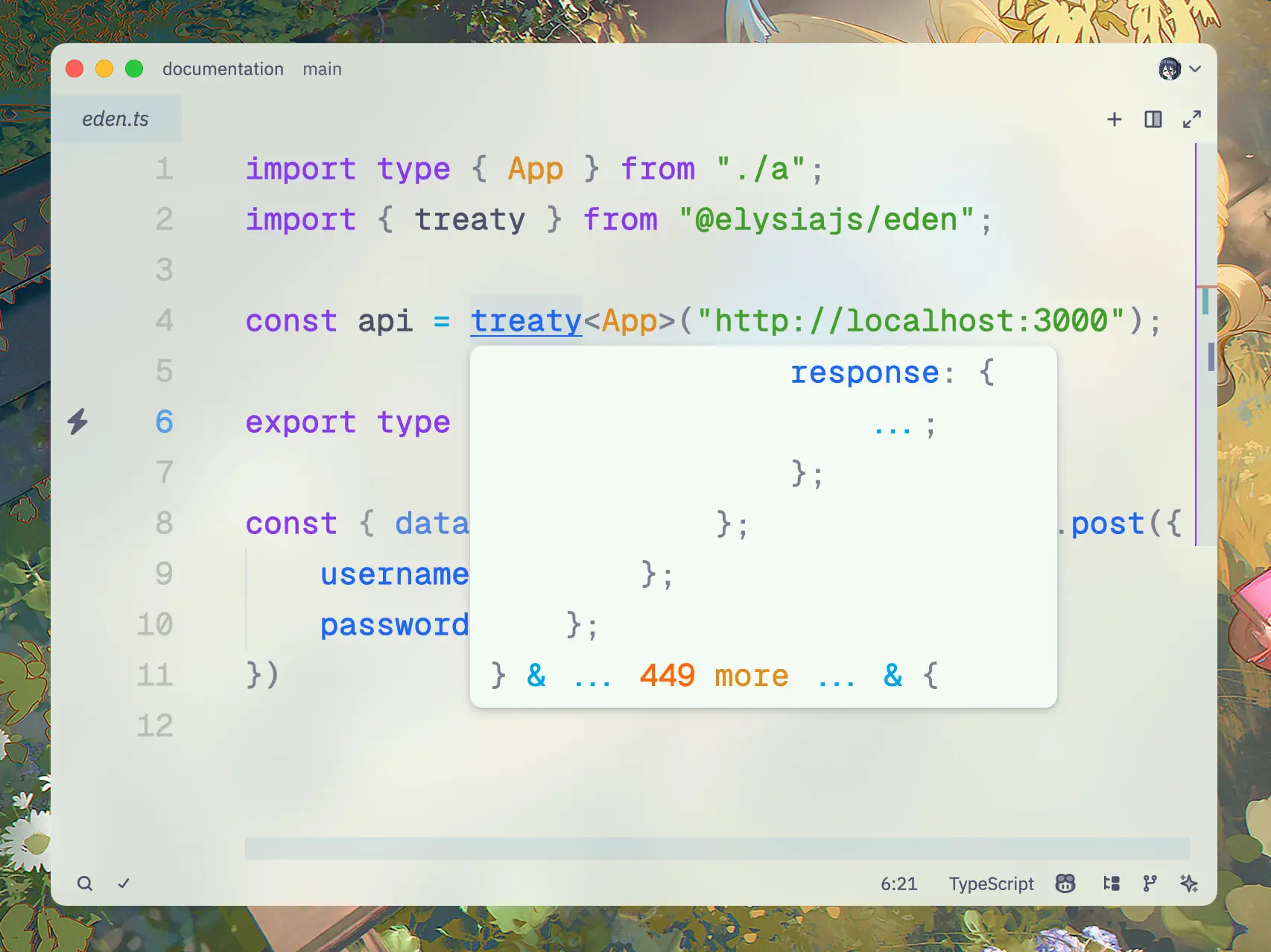
Elysia Eden code showing type inference without error
The author reported successful inference for the Elysia and Eden configuration with up to 2,000 routes. Because the Hono run aborted, its elapsed time cannot establish a completed-check speed ratio.
Test both clients against your own route and schema structure when evaluating end-to-end type safety.
Both are next generation web frameworks built on top of Web Standard API with slight differences.
Elysia is designed to be ergonomic and developer-friendly with a focus on sound type safety, and has better performance than Hono.
Hono offers broad compatibility with multiple runtimes, especially with Cloudflare Workers, and a larger user base.
Alternatively, if you are coming from a different framework, you can check out: