OpenAPI
Elysia is built around OpenAPI, and supports OpenAPI documentation out of the box.
We can use OpenAPI plugin to show an API documentation.
import { Elysia, t } from 'elysia'
import { openapi } from '@elysia/openapi'
Once added, we can access our API documentation by switching the request bar path to /openapi.
Detail
We can provide API documentation with a detail field which follows OpenAPI 3.0 specification (with auto-completion):
import { Elysia, t } from 'elysia'
import { openapi } from '@elysia/openapi'
summary: 'Create a user',
description: 'Create a user with age',
Reference model
We can also define reusable schema with Reference model:
import { Elysia, t } from 'elysia'
import { openapi } from '@elysia/openapi'
summary: 'Create a user',
description: 'Create a user with age',
When we defined a reference model, it will be shown in the Components section of the OpenAPI documentation.
Type gen
OpenAPI type gen can document your API without manual annotation infers directly from TypeScript type. No Zod, TypeBox, manual interface declaration, etc.
This feature is unique to Elysia, and is not available in other JavaScript frameworks.
For example, if you use Drizzle ORM or Prisma, Elysia can infer the schema directly from the query.
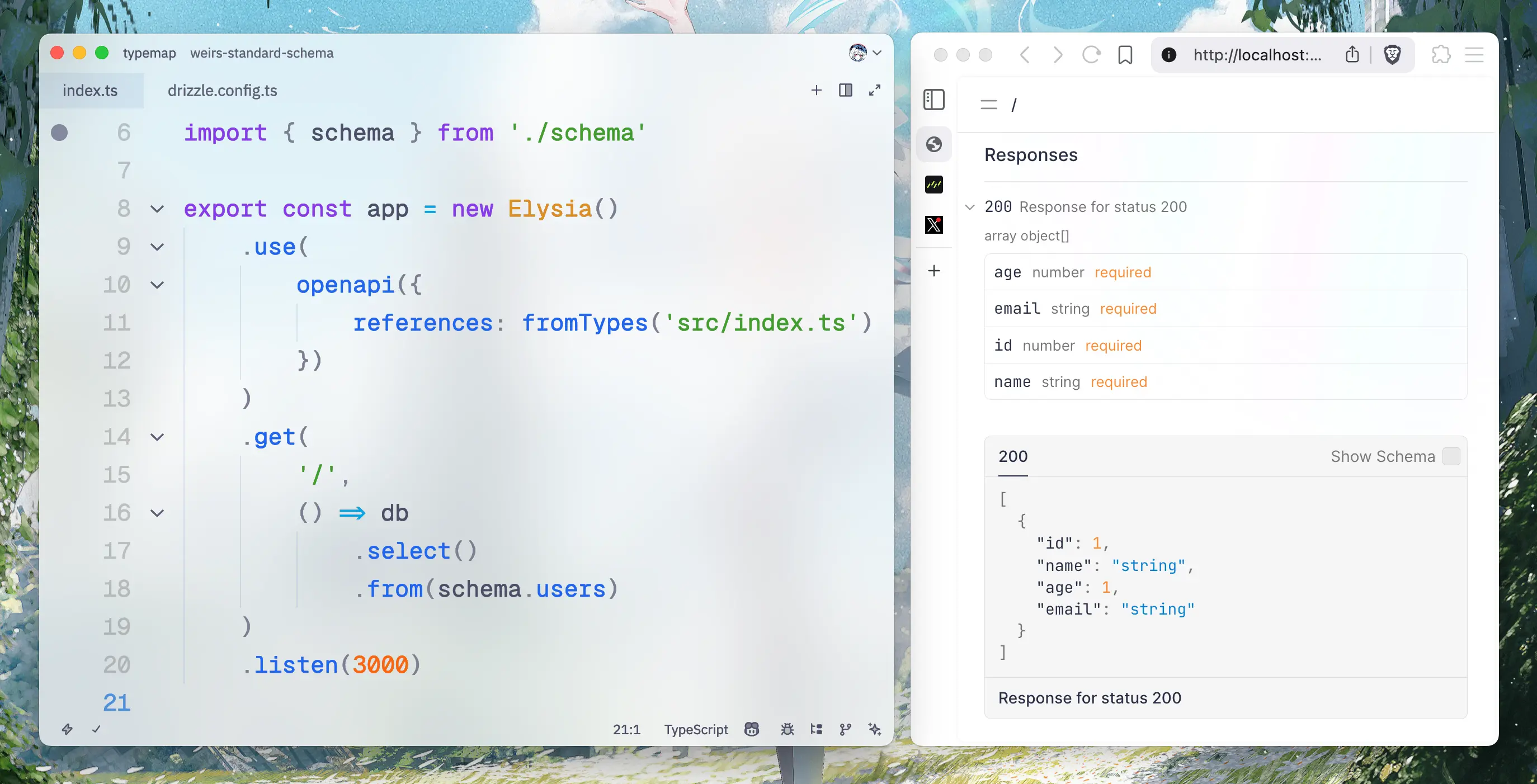
Returning Drizzle query from Elysia route handler will be automatically inferred into OpenAPI schema.
To use OpenAPI type gen, simply apply the fromTypes plugin before openapi plugin.
import { Elysia } from 'elysia'
import { openapi, fromTypes } from '@elysia/openapi'
.get('/', { hello: 'world' })
Browser environment
Unfortunately, this feature requires the fs module to read your source code, and is not available in this web playground. As Elysia is running directly in your browser (not a separated server).
You can try this feature locally with Type Gen Example repository:
git clone https://github.com/SaltyAom/elysia-typegen-example && \
cd elysia-typegen-example && \
Assignment
Let’s use the preview to GET ‘/openapi’ and see how our API documentation looks.
This API documentation is reflected from your code.
Try to modify the code and see how the documentation changes!