



Following our convention, this release is named after the song DayDream from Guns Girl Z 9th anniversary song.
Elysia 2 is a complete rewrite of Elysia, restarting from zero and focusing on other areas, not just throughput.
The name is to honor the struggle Kiana went through, a long journey to make her wish come true.We tried to make Elysia the fastest JavaScript framework. But we have sacrificed a lot in the process. Memory usage, bundle size, and startup time were secondary concerns.
The scope goes further than we originally designed it to be and the features we added keep piling up like technical debt.
We never expected Elysia to be where it is today so we didn’t really design it for a really big scale. We thought it would be a niche framework that solves specific problems so we never marketed or advertised Elysia other than just posting on a personal X/Twitter profile.
But we were wrong.
Today, Elysia is the 9th most used JavaScript backend framework and highlighted at State of JavaScript 2025.
We genuinely believe in building decent software, and if it’s good then people will follow and you proved that to us. Much more than we thought.
From your feedback, we now realize that there are more important things to consider other than the runtime performance.
So we rethink all the scope and features it has. We read Elysia’s codebase and rearchitect it with all of the features we have from the ground up while keeping performance as a priority.
Elysia 2 beta is, well, beta. It’s not a stable release yet. You can try it with elysia@next.
# auto migrationbunx @elysia/codemod@latest
# manual migrationbun add elysia@next- Bundle Size
- Startup Time
- Memory Usage
- TypeBox
- Ahead of Time Compilation
- Startup Time
- Adapter and Runtime
- Faster APIS
- Defer
- Breaking Change
- Stability
- What to expect
- Afterwords
Bundle Size
Section titled “Bundle Size”We have made Elysia 2 smaller than Elysia 1.4 by more than 50% and we can make it even smaller with a build plugin.
Tree Shake TypeBox
Section titled “Tree Shake TypeBox”Elysia 2 is designed to be modular. We added Standard Schema support in 1.4 but because of the structure, Elysia still bundles TypeBox whether you use it or not.
Elysia 2 can now fully tree-shake TypeBox out entirely if you don’t use it.
- None736 KB344 KB
- TypeBox736 KB847 KB
- Valibot742 KB350 KB
- Zod1,260 KB868 KB
We can get it down even more by using an AOT build plugin to analyze and remove unused parts of Elysia’s features.
- None344 KB226 KB
- TypeBox847 KB288 KB
- Valibot350 KB266 KB
- Zod868 KB784 KB
226KB sounds big but it is an un-minified result so if we minify it, it becomes 141KB.
And if we compare it to other frameworks, it’s actually quite small.
- Hono4.12.2821 KB
- h32.0.1-rc.26103 KB
- Elysia2.0.0-exp.60141 KB
- Effect HTTP Node4.0.0-beta.102357 KB
- Express5.2.1603 KB
- Koa3.2.1554 KB
- Fastify5.10.0729 KB
- Adonis5.8.01.2 MB
- Nest10.2.81.3 MB
bun build --minify, see HTTP benchmark.
Roughly ~50% of Elysia 2’s footprint is Sucrose (Static Code Analysis) and an Ahead of Time compiler.
Even with these, Elysia still manages to be much smaller than traditional frameworks like Express, Fastify and Koa by a mile.
Startup Time
Section titled “Startup Time”Besides bundle size, startup time is also a big concern for Serverless and Edge functions like Cloudflare Worker, Vercel Edge Function.
We have improved the startup time of Elysia 2 by more than 30% especially with TypeBox.
- None37 ms26 ms
- TypeBox37 ms28 ms
- Zod46 ms36 ms
And we can measure a server’s startup time compared to other frameworks.
At 25 Routes
Section titled “At 25 Routes”The server is registered with 25 routes with distinct 5-field schemas. Startup time is measured from starting the server until the first request hits.
- Hono21 ms
- Elysia24 ms
- Elysia + TypeBox28 ms
- Hono + Zod33 ms
- Elysia + Zod38 ms
- Express61 ms
- Express + Zod72 ms
- Fastify90 ms
- Fastify + Zod93 ms
At 1,000 Routes
Section titled “At 1,000 Routes”Each app registers 1,000 POST routes, each with a distinct 5-field schema.
- Hono23 ms
- Elysia29 ms
- Elysia + TypeBox43 ms
- Hono + Zod56 ms
- Express60 ms
- Elysia + Zod67 ms
- Express + Zod103 ms
- Fastify108 ms
- Fastify + Zod154 ms
Memory usage
Section titled “Memory usage”Using the same benchmark as before,
At 25 Routes
Section titled “At 25 Routes”Same condition as before. The server is registered with 25 routes with distinct 5-field schemas. Startup time is measured from starting the server until the first request hits.
- Hono35 MB
- Elysia36 MB
- Elysia + TypeBox42 MB
- Hono + Zod47 MB
- Elysia + Zod48 MB
- Express55 MB
- Fastify56 MB
- Express + Zod61 MB
- Fastify + Zod63 MB
Before/After loadtest
Section titled “Before/After loadtest”To measure accurate memory usage, we measure the memory before and after running HTTP loadtest. The source can be found at HTTP benchmark.
- Elysia2.0.0-exp.6037 MB45.7 MB
- h32.0.1-rc.2643.3 MB66.4 MB
- Hono4.12.2832.4 MB73.9 MB
- Effect HTTP Node4.0.0-beta.10291.3 MB132.3 MB
- Express5.2.160.5 MB150.8 MB
- Adonis5.8.0123.5 MB160 MB
- Fastify5.10.098.5 MB192.4 MB
- Koa3.2.194.8 MB200.4 MB
- Nest10.2.8118 MB213.7 MB
Elysia clearly has the lowest memory usage after loadtest with the most stable and predictable memory usage.
This is important for 2 things:
- Serverless and Edge Function where memory usage is billed by the second and the memory usage is limited
- Cluster mode will duplicate the process and the memory usage will be roughly multiplied by the number of clusters
This means if you run an HTTP server in cluster mode with 10 CPU cores using 10 workers, the memory usage will be ~10x of the original.
- If you run Elysia with 10 workers, the memory usage will be ~450 MB.
- If you run Hono with 10 workers, the memory usage will be ~740 MB.
- If you run Fastify with 10 workers, the memory usage will be ~2,100 MB.
TypeBox
Section titled “TypeBox”We have updated from TypeBox 0.34 to TypeBox 1.3. Please refer to TypeBox 1.0 migration guide.
Cookie Schema per field
Section titled “Cookie Schema per field”Elysia now supports setting Cookie schema per field instead of setting it as a whole.
new Elysia() .get( '/', { cookie: t.Object({ a: t.Cookie(t.String(), { sign: true }) }) }, () => 'ok' )t.Accelerate
Section titled “t.Accelerate”Convert schema to TypeBox Compiler via Standard JSON Schema for best performance.
import * as z from 'zod'
new Elysia()  .post(    '/',    {      body: t.Accelerate(        z.object({          name: z.string()        })      )    },    () => 'ok'  )
This API is flagged as alpha. Proceed with caution.
Ref:Rain
Section titled “Ref:Rain”We didn’t re-export TypeBox but we built a small abstraction over it. “Ref:Rain” is a nickname for that small abstraction of TypeBox.
In a real-world app, not all schemas are distinct. Some repeated schemas like params or query could be shared and reused.
Starting from a primitive type, many schemas would just use an empty primitive type like this.
t.Object({ name: t.String(), age: t.Number()})If these primitive types are called 100k times, they would create new allocations. So instead of allocating 100k schemas, we simply reuse them by reference.
- Elysia 1.433.86 MB
- Elysia 217.69 MB
Compilation
Section titled “Compilation”We notice that there are some areas where schemas could be repeated, eg. query, params or even reference schema.
We have added Schema Compilation Cache to prevent unnecessary recompilation. It will omit metadata like description, examples, tags before checking the cache, so duplicated schema with OpenAPI metadata would be cached as well.
Compile 100k routes with schema
Section titled “Compile 100k routes with schema”- Elysia1.4174,603 ms1,158 MB
- Elysia2310 ms228 MB
The result is not a typo. And Elysia 2 can completely offload the compilation process to build time.
100k complex schemas
Section titled “100k complex schemas”Create 100k TypeBox schemas with 45 types each.
- Elysia1.4227 ms319 MB
- Elysia2209 ms228 MB
All of these result in better overall memory usage by 33%.
Ahead of Time Compilation
Section titled “Ahead of Time Compilation”Elysia has a “compiler”. It analyzes your handler to produce the optimal route handler.
This is what makes Elysia so fast but it came with a cost. This process happens once at server start and once for each route, which adds a micro-delay until the route can run. Each compilation alone is very fast, but it adds up especially for a real-world app.
We rewrite Elysia’s “compiler” to be able to offload to build-time instead, or so-called Ahead of Time Compilation.
import { aot } from 'elysia/plugin/aot/bun'
const { outputs } = await Bun.build({  entrypoints: ['src/index.ts'],  outdir: 'dist',  target: 'bun',  plugins: [aot('src/index.ts')]})
You can opt-in by using export for your Elysia instance, then set up a build script and point the plugin to the main Elysia instance you want.
AOT plugin does all of the following:
- Compile handler code
- Compile TypeBox schema
- Compile Exact mirror schema
- Precompute
defaultproperty merger - Statically analyze unused Elysia modules
- Create optimal code for each target platform
- If all TypeBox schemas can be compiled, stub TypeBox entirely
Elysia will then attempt to dry-run the app to reproduce the most accurate result.
At runtime, Elysia will simply use the built schema and skip the compilation entirely.
Startup Time
Section titled “Startup Time”Elysia 1.4 needs to compile fetch entry handler. So every first request to the server is 2 compilations away.
In Elysia 2, we have removed the compilation in the fetch entry entirely, and offloaded request compilation to AOT, which results in far better startup time.
- Elysia 1.40.851 ms
- Elysia 2 AOT0.046 ms
Memory Usage
Section titled “Memory Usage”An app with 100k distinct schemas with eager compilation can expect a far better result:
- Elysia24,110 ms1.65 GB
- Elysia2 AOT775 ms400 MB
Synthetic Memory benchmark
Section titled “Synthetic Memory benchmark”- Elysia 132.1 KB/route36.9 KB/route
- Elysia 2 (JIT)2.3 KB/route5.8 KB/route
- Elysia 2 + AOT4.6 KB/route4.7 KB/route
In the real world, an “identical handler” is very unlikely to occur but we include it to address the result of synthetic benchmark.
Partial Default Merge
Section titled “Partial Default Merge”Elysia 2 can now allocate static default values ahead of time, and can apply partial merging much faster.
- Elysia 1.421.6 μs
- Elysia 22.5 μs
Target
Section titled “Target”Build plugin is not limited to Bun. We have support and regression tests for the following bundlers:
- Bun.build
- vite
- esbuild
- rspack
- unplugin
Each bundler plugin can be imported by its respective name under elysia/plugin/aot/<name> and used like a regular plugin.
import { aot } from 'elysia/plugin/aot/vite'
export default defineConfig({  plugins: [aot('src/index.ts')]})
Unplugin can also be expanded to additional bundlers like:
- rollup
- rolldown
- webpack
- farm
Should I use Ahead of Time Compilation?
Section titled “Should I use Ahead of Time Compilation?”Yes if applicable.
We almost always see a great result in all apps that opt-in to AOT build mode.
The actual cost of AOT mode is that it will produce inline code for each route and schema into your final bundle. This might slightly increase bundle size and the small amount of memory retained at app start but greatly reduces peak memory usage.
Build Time Environment
Section titled “Build Time Environment”Because AOT plugin will dry run your app, there are 2 things that you have to look out for.
- Long running process, eg. Database connection like Postgres Pool, Redis Pool.
This will prevent your app from exiting in the build environment so it’s recommended to add process.exit(0) once your bundler is done packing up your code.
Bun.build({ entrypoints: ['src/index.ts'], outdir: 'dist', target: 'bun', plugins: [aot('src/index.ts')]}).then(() => { process.exit(0)})- Conditional flag
Apps that opt-in to Elysia AOT should call Elysia APIs exactly the same way at build time and runtime to prevent an invalid manifest.
Elysia should be able to detect if that’s the case and panic upfront before starting the server and notify you of the reason and a suggestion.
Because it’s a dry-run, you can conditionally skip some parts of your app by inAotBuild:
import { inAotBuild } from 'elysia'
if (inAotBuild())  console.log('Do something in AOT dry-run')
Cloudflare Worker
Section titled “Cloudflare Worker”If you are using Cloudflare Worker, we recommend opting-in to AOT to prevent paying the startup time cost upfront.
Because Cloudflare Worker doesn’t allow new Function, you have to either compile all routes upfront and pay for all compilation at start or simply move that process to build time.
Cloudflare Worker already recommends using Vite plugin to build before publishing your worker code, so the process is simply adding one more plugin to your Vite config.
import { defineConfig } from 'vite'import { cloudflare } from '@cloudflare/vite-plugin'import { aot } from 'elysia/plugin/vite'
export default defineConfig({  plugins: [cloudflare(), aot('src/index.ts')]})
Adapter and Runtime
Section titled “Adapter and Runtime”Elysia has always been using Web Standard Request/Response similar to Hono from day 1. This means Elysia is as portable as Hono if the runtime supports Web Standard Request.
For runtimes that don’t support Web Standard, Elysia offers an Adapter API to run HTTP servers in various environments.
The catch phrase of Elysia is “optimize for Bun” NOT “only run on Bun”, it has never been the case especially when it is built on the same foundation as Hono, which is advertised as “portable”.
Adapter v2
Section titled “Adapter v2”Adapter has now been reworked and is publicly available instead of being private.
Previously, Elysia adapter used stringified code that would be passed to the compiler. This made it hard to create or contribute to one.
In Elysia 2, all fields are now just functions.
import { createAdapter } from 'elysia/adapter'
const adapter = createAdapter({  name: 'bangboo',  // map value to response, not limited to Web Standard  response: {    map: mapResponse  },  setup(app: Elysia) {    // do something with Elysia    // run before listen  },  listen() {    // bind to runtime HTTP server  },  // an so on  ...rest})
All fields are type-safe, and the function basically returns an object that you can easily modify or swap as you see fit.
Node runtime
Section titled “Node runtime”We are using Adapter v2 to wire Elysia Node adapter to use srvx and crossws under the hood.
import { Elysia } from 'elysia'import { node } from '@elysia/node'
new Elysia({ adapter: node() })  .listen(3000)
We have updated srvx to 0.12 with FastResponse which should greatly improve performance to almost the same as normal Node HTTP library.
- ElysiaBun 2.0.0-exp.60210,411 req/s
- HonoBun 4.12.28168,275 req/s
- FastifyNode 5.10.0101,360 req/s
- ElysiaNode 2.0.0-exp.6093,845 req/s
- HonoNode 4.12.2886,129 req/s
- Effect HTTPBun 4.0.0-beta.10288,936 req/s
- Effect HTTPNode 4.0.0-beta.10259,958 req/s
- KoaNode 3.2.143,294 req/s
- ExpressNode 5.2.142,974 req/s
- AdonisNode 5.8.036,557 req/s
- NestNode 10.2.831,675 req/s
Node Websocket
Section titled “Node Websocket”We have separated the WebSocket from normal node adapter to reduce bundle size. If you want to use websocket on Node, simply import from websocket sub-folder.
import { Elysia } from 'elysia'import { node } from '@elysia/node/websocket'
new Elysia({ adapter: node() })  .listen(3000)
Faster APIs
Section titled “Faster APIs”HTTP throughput, post memory usage and startup time are not the only metrics that matter. We need to consider how real world apps are used, e.g., plugin, lifecycle-event.
Here we gather some metrics on several Elysia APIs to see how they perform.
You can find the source code of the benchmark in elysia/example/stress.
Adding 100k Routes
Section titled “Adding 100k Routes”Repeatedly add 100k static routes to the app and measure the time taken to finish.
- stress/route.ts- Elysia27 ms31 MB
- Elysia1.423 ms317 MB
- Hono4.12.32172 ms203 MB
Apply 100k Routers
Section titled “Apply 100k Routers”Repeatedly apply 100k Elysia instances that have 1 route to the main app and measure the time taken to finish.
- Elysia25 ms9 MB
- Elysia1.4116 ms116 MB
- Hono4.12.32192 ms503 MB
Apply 100k Plugins with Hooks
Section titled “Apply 100k Plugins with Hooks”Repeatedly apply 100k Elysia instances that contain 1 lifecycle event with scope/plugin encapsulation scope or simply apply middleware in Hono.
- Elysia210 ms15 MB
- Elysia1.458 ms126 MB
- Hono4.12.32252,847 ms21,558 MB
Elysia now supports programmatically adding callback functions to run after a response is sent.
new Elysia()  .get(({ defer }) => {    const disconnect = connect()
    // run after response is sent    defer(() => {      disconnect()    })  })
defer will execute in a queue after the afterResponse hook.
Breaking Change
Section titled “Breaking Change”We have updated some APIs and removed several soft deprecated APIs in this version.
To make migration to Elysia 2 as smooth as possible, we offer Elysia codemod which should automate 95% of the code to Elysia 2.
bunx @elysia/codemod@latestRoute Parameter Swap
Section titled “Route Parameter Swap”We have run the survey and found that many developers would prefer a hook/schema to come before handler.
new Elysia() .post('/', { isAdmin: true, body: t.Object({ name: t.String() }) }, () => { // handler })This way, it’s more ergonomic to read and review code instead of:
- See route and handler
- Scroll down to hook metadata
- Scroll back up to read the code
The old API makes you go up-down-up-down more than you should have, so we changed that so it’s easier to read the code.
This migration can be fully automated by codemod.
@elysia scope
Section titled “@elysia scope”We have disputed and obtained the @elysia scope from npm.
We will be using @elysia to publish officially maintained Elysia plugins for Elysia 1.4+ and leave @elysiajs to support Elysia 1.x plugins.
Error Handling
Section titled “Error Handling”We have completely changed the error handling API. Previously, we were using code to differentiate an error.
But we mainly have 3 problems with that.
1. Redundant boilerplate
Section titled “1. Redundant boilerplate”To add code, we have to register all errors with error. The instance will carry the type inference for the code name as follows:
And to safely infer code and error type, you would need to import a base instance that carries that type inference:
const ErrorDictionary = new Elysia()  .error('MyError', MyError)
const ErrorHandler = new Elysia()  .use(ErrorDictionary)  .onError(({ code, error }) => {    switch(code) {      case 'MyError':        // correctly infer        return error    }  })
const WithoutDictionary = new Elysia()  .onError(({ code, error }) => {    switch(code) {      // No infer      case 'MyError':        // Generic Error        return error    }  })
This adds additional boilerplate and doesn’t support circular dependency.
2. Adding Prototype
Section titled “2. Adding Prototype”To make this possible, error would add a new prototype to input Error class.
Then Elysia will look up the error prototype and match that.
3. Type Inference
Section titled “3. Type Inference”It is not possible to infer response types because it’s not statically possible to analyze the error handling.
New API
Section titled “New API”To solve this, we remove error code entirely and introduce a new API that takes an Error class directly.
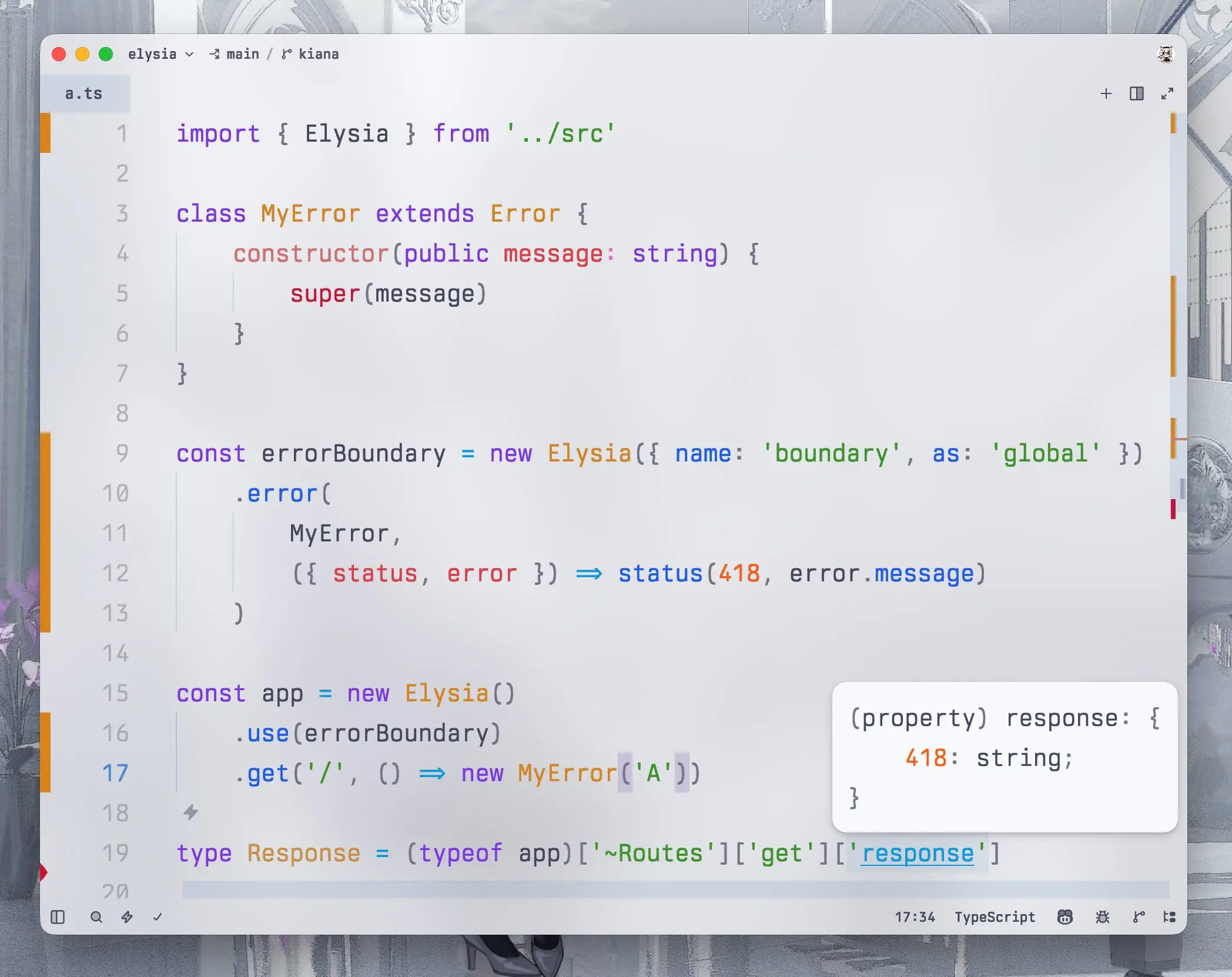
new Elysia() .onError(MyError, () => { // do something })This solves all 3 problems we previously had while making it much more concise. You can imagine this is like mapResponse but exclusively for error handling.
Because of this change, it is possible to infer Error and mapped value directly into route response type.
This means any error will be able to be collected correctly and make Eden Error handling much more expressive.
Elysia Error
Section titled “Elysia Error”To use Elysia specific errors like notFound, validation, simply import the respective error name from Elysia.
import { NotFound, ValidationError } from 'elysia'
new Elysia()  .onError(NotFound, () => {  })  .onError(ValidationError, () => {    // do something  })
Fallback
Section titled “Fallback”To handle fallback case where error is not statically analyzable, simply use instanceof Error.
import { NotFound, ValidationError } from 'elysia'
new Elysia()  .onError(({ error }) => {    if (error instanceof MyError)      // do something  })
Problem Error
Section titled “Problem Error”Elysia now uses RFC 9457: Problem Details API for describing errors.
All Elysia errors now return problem detail JSON instead of bare strings and align to use problem detail structure instead.
Additionally, Elysia now uses application/problem+json headers to send error instead of application/json.
To opt in, you can use problem instead of status which handles the necessary work instead for RFC 9457.
import { Elysia, problem } from 'elysia'
new Elysia()  .get('/', () => problem(418, {    detail: 'I love teapot'  }))  .onError(MyError, () => problem(418, {    detail: 'I love teapot'  }))
Eden already handles new headers and format but for other clients, make sure to double check your frontend to see if it works.
return or throw
Section titled “return or throw”This behavior has caused a lot of confusion for many users. All errors, whether returned or thrown, will now be able to be intercepted by onError.
Macros
Section titled “Macros”.macro(name, definition) is now removed.
It was introduced as a workaround to fix macro with resolve and/or schema.
// Elysia 1.xnew Elysia()  .macro('auth', {      resolve: ({ headers }) => ({ user: auth(headers) })  })  .get('/', ({ auth }) => auth)
// Doesn't work in Elysia 1.x but work in 2.0new Elysia()  .macro({    auth: {      derive: ({ headers }) => ({ user: auth(headers) })    }  })  .get('/', ({ auth }) => auth)
Now that this is fixed, we now remove the workaround method to simplify macro API.
WebSocket
Section titled “WebSocket”WebSocket is now an opt-in feature and has a similar API to .get, .post and other normal APIs.
import { websocket } from 'elysia/websocket'
new Elysia()  // add only once in any part of an app  .use(websocket())  .ws('/', ({ params: { id } }) => id)  .ws('/stream', function* () {    // instead of ws.send(1)    yield 1    yield 2    yield 3  })
The original WebSocket is modeled after Bun. However, we found that there’s really no reason for an end-user to understand what Bun websocket looks like to use WebSocket.
So instead, we replace it with already familiar Elysia APIs for a better mental model and type inference.
With a generator function and yield, Elysia can now infer an actual WebSocket response directly instead of using a secondary source like a response schema.
Changes to watch out for
Section titled “Changes to watch out for”.ws()now accepts 2-3 arguments- 2-arg forms (
.ws('/ws', handler),.ws('/ws', options)) are unchanged - 3-arg form is now
.ws('/ws', options, handler)
- 2-arg forms (
ws.datais now inlined towsdirectly- generator functions and
yieldare now the preferred way of sending data instead ofws.sendfor type safety
resolve is now derive
Section titled “resolve is now derive”We found that most people are confused about when to use derive and resolve and often mistake one for another.
We figured out that most people would actually need derive to run on beforeHandle not transform.
So old resolve is the new derive:
derivenow runs onbeforeHandle(previousresolvebehavior)resolveis now removed
// 1.xapp.resolve(({ headers }) => ({ user: auth(headers) }))
// 2.0app.derive(({ headers }) => ({ user: auth(headers) }))
‘scoped’ scope is now ‘plugin’ scope
Section titled “‘scoped’ scope is now ‘plugin’ scope”- The
{ as: 'scope' }object form is deprecated. Hook methods still accept it with a one-time warning and map'scoped'to'plugin', but.guard({ as })throws - Pass the scope as the first argument instead. A positional
'scoped'throws .decorate()/.state(){ as: 'append' | 'override' }
// 1.xapp.onBeforeHandle({ as: 'scoped' }, fn)app.as('scoped')app.guard({ as: 'scoped' }, fn)app.decorate({ as: 'override' }, 'db', db)
// 2.0app.onBeforeHandle('plugin', fn)app.as('plugin')app.guard('plugin', fn)app.decorate('override', 'db', db)
Guard/group default to ‘override’
Section titled “Guard/group default to ‘override’”Every .guard() and .group() defaults to override
- the closer to the route, the more power, the nearer schema replaces an inherited one
schema: 'standalone'is explicitly required across all APIs
Migration: if you use guard, add schema: 'standalone':
// 1.x string-scope & run forms were implicitly additive (standalone)app.guard({ body: t.Object({ a: t.String() }) })
// 2.0 now overrides by default; prefer closer schema firstapp.guard({ schema: 'standalone', body: t.Object({ a: t.String() }) })
aot: false is removed
Section titled “aot: false is removed”Dynamic mode is now removed entirely and replaced by AOT mode.
Remove file-type
Section titled “Remove file-type”Elysia 2 now doesn’t include the file-type package to verify a file’s mime type by default.
It’s only used with t.File and t.Files with specified type. Any app that doesn’t use this carries a heavy module, so now we remove it by default.
To migrate, simply call setFileTypeDetector and pass fileTypeFromFile or your own implementation in any part of an Elysia app.
import { setFileTypeDetector } from 'elysia'import { fileTypeFromFile } from 'file-type'
setFileTypeDetector(fileTypeFromFile)
Stability
Section titled “Stability”Elysia now covers more unit tests, increased from 2800 expect calls to 10,000+ expect calls.
This includes performance and memory usage reports and a bundle size hard guard per commit and pull request to prevent and track performance regressions.
Additional Change
Section titled “Additional Change”You can find additional internal or smaller changes that shouldn’t affect most apps here: migration guide
Behavior Change
Section titled “Behavior Change”context.pathis now readonly- Validation error
payload.expectedvalues are shared and deeply frozen - Schemas are cloned on first registration and reused by identity
- Signed-cookie verification now defaults to
verify: 'lazy' - Values returned early from
onRequest()hooks now pass throughmapResponsebefore they are sent. - [Type] instance-level
.onParse()and.onTransform()no longer inherit ANY guard input schema — its context is typed as raw, pre-validation values (path params from the instance prefix are kept) afterHandlewill skip the rest when short-circuitingError.summarynow uses default TypeBox message insteadError.summarynow has support for Standard Schema- Validator runs
Convertand reorders toConvert -> Check -> DecodeUnsafefor codec schemas streamResponse(adapter utils) now yields raw body chunks- a bodyless
GET/HEADroute no longer runsparselifecycle hooks - the default validation (422) response now scopes the echoed
foundvalue: a request body whose JSON exceeds 4KB is no longer reflected back in full - only register static content to Bun.serve.routes
- Bun native static-route dispatch is no longer disabled by the presence of an
errorhook mapResponsehook or a request schema now correctly fall through to the JS path instead of being served natively unmapped/unvalidated in Bun.serve.routes- unhandled errors no longer leak their
messageto the client whenNODE_ENV=production - thrown/returned generic
Erroror anyElysiaErrorwith status >= 500 without explicitresponse, now responds withInternal Server Errorinstead of the raw error message for security reasons - the JSON error response produced by the response mapper for a returned/mapped
Errorno longer includes thecausefield, and itsmessageis replaced withInternal Server ErrorwhenNODE_ENV=production. Non-production output is unchanged ({ name, message, cause }) file()responses resolve theircontent-typefrom a case-insensitive file extension- synchronous Standard Schema validators no longer force async route emission
- Bun native static-route
Responseobjects are no longer retained on the base Elysia instance during router build
Improvement
Section titled “Improvement”t.File({ type })/t.Files({ type })content-detection failures now report the offending property path (property: '/avatar',/files/0) instead of an empty path — the validated value is identity-walked only when a detection fails- adapter v2
- sub type validator
- shared validator cached
- shared schema reference
- Cookie schema field
- plain
t.File()/t.Files()(notypeoption) no longer force the async validation path
Bug fix
Section titled “Bug fix”- return 415 when unsure about content-type
context.servernow receives the active Bun server for socket requests and isnullfor directapp.handle()- non-Bun (Node / web-standard) adapters, a plain-string response now sets
content-type: text/plain - cookie values were percent-decoded twice (
parse()already decodes), corrupting any value that decodes to something still containing%xx(e.g.100%2520off->100 offinstead of100%20off) .compile()overwrote WebSocket upgrade handlers with a generic HTTP handler, breaking upgrades after eager/AOT compilationnormalize: falsereturned the precomputed default object by reference, so one request’s handler mutation of a defaulted body/query leaked into subsequent requests- a standalone
responseschema without a200entry threw'~kind' in undefined - dynamic (parameterized) routes did not match a trailing slash under the default
strictPath: false - per-app
loosePath/decoded-path caches grew without bound on attacker-controlled request paths - an
onErrorreturning aFile/Blobthrew aTypeError - response headers were dropped on non-Bun runtimes when re-streaming a returned
Response - a
wrap()HOC was skipped for native static routes on Bun - signed-cookie HMAC comparison fell back to a non-constant-time
===off Bun (timing side channel) - cookie secret rotation with a
null(“allow unsigned”) entry threwSecret key must be providedfor any value containing a dot application/xmlwas parsed asx-www-form-urlencoded- Sucrose: handlers using optional chaining on the context (
ctx?.query) did not infer the field - an unguarded
JSON.parsein query array parsing turned malformed input into a request-controlled 500 - Bun native static routes were never installed when every static response was synchronous
- error-path
mapResponsecodegen assigned an undeclaredtmp, leaking the mapped response ontoglobalThis - schema-less body routes now treat
Transfer-Encodingas body-present before touchingrequest.body, preserving the fast framing-header path for chunked/proxy-framed requests withoutContent-Length
What to expect from Elysia 2
Section titled “What to expect from Elysia 2”It’s not likely that you will see significantly faster throughput with Elysia 2.
Elysia 2 is a better foundation of Elysia with all of the scope we have and will have in the future with a broader goal than just pure throughput.
What you should look out for is a reduced peak memory usage and faster startup time, especially with Serverless environments like Cloudflare Worker.
Although this version is a bit rough because of all the breaking changes and the rewrite, you should be able to expect a much more solid experience with the future version of Elysia.
Should I update to Elysia 2 beta?
Section titled “Should I update to Elysia 2 beta?”Elysia 2 is well tested in synthetic environments and some of our internal servers without critical problems.
Codemod can handle almost all of the cases and we use it to migrate all Elysia plugins with ~95% coverage without much effort.
bunx @elysia/codemod@latestWe label the current version “beta” as a graceful transition duration for plugin developers to update their plugin to Elysia 2.
It’s stable enough on our end that we are confident enough to migrate our own apps to Elysia 2 beta. But because it’s an entire rewrite, there might be some quirks compared to the previous version but we think it’s stable enough. Far more stable than any beta Elysia version we have shipped.
We will keep the beta label until significant portions of plugins have been migrated to Elysia 2.
Afterwords
Section titled “Afterwords”DayDream is a big release for Elysia with more than 8 months in the making.
This wouldn’t be possible without all of the sponsors, especially Jarred Sumner. They make it possible for me to maintain Elysia full-time.
Not without all of the time and resources the community has given us not just financially but emotionally as well.
“Daydream” as a song got me every single time, especially with the story of where it comes from. GGZ was probably one of the very first mobile games I got to play. Seeing the story of how your favorite character struggles through so much hardship just to make her wish come true in the end makes me want to do the same.
8 months for me feels like it passed in the blink of an eye. Yesterday I was writing the Elysia 1.4 release notes and now I’m writing Elysia 2. And there is still a much longer road ahead.
But even if the road is infinitely long, there will be one day we reach the end eventually.
Per Ardua Ad Astra
Through struggles to the stars.
I saved this version name because it has a special place in my heart. For a very special occasion, especially now that it fits today’s Elysia occasion perfectly.
With Elysia now, we literally just wake up to see that everything we did is just a dream. A slightly different but better reality to wake up in.
I have been dreaming since I was a kid that I want to create something for people to use to build great things. I tried so hard to make Elysia as great as it could be. I try my best every day to make the best tool in the world, and sometimes I’m a bit too hard on myself.
Sometimes I wonder why I spent so much time in Open Source. Is it really worth it? Financially, it’s terrible. Long term sounds terrible. Nothing sounds wise about working in non-self sufficient Open Source Software at all. But still, I keep going.
When I’m tired and don’t want to do anything anymore, sometimes I just stop. And I secretly look at how people use Elysia without interacting. I see a lot of Japanese, Korean, Spanish blog posts/videos about Elysia even if I don’t understand it.
Seeing how people use your tool that you spent so much effort building for years, a story, an experience of how Elysia helps you build your tool, is something I’m not sure how to describe. It’s a treasure only for me to cherish.
It’s something that keeps me going every day. To realize that what I do has a meaning. To realize that I’m not alone.
How many wishes do I have to make for the dawn to break
Will there ever come a day when all of this ends?
If I wipe away my tears, my longing will definitely become my strength
Even though I didn’t close my eyes
I saw a dream, it was such a noisy dream
I really want to see you, run to you, and say “Long time no see”
Even if I know it’s just a stupid dream, I still want to keep on dreaming.
I still have so many more plans for Elysia that I want to share with you.
Even though I didn’t close my eyes, I saw a dream
It was such a noisy dream
I want to see you, I want to meet you
Thank you for staying with me.
- SaltyAom