


Named after the opening of the legendary anime, “No Game No Life”, 「This Game」composed by Konomi Suzuki.
This Game pushes the boundary from medium-size projects to large-scale apps with a re-imagined plugin model, dynamic mode, pushing developer experience with declarative custom errors, collecting more metrics with ‘onResponse’, customizable loose and strict path mapping, TypeBox 0.30 and WinterCG framework interop.
(We are still waiting for No Game No Life season 2)
Section titled “(We are still waiting for No Game No Life season 2)”New Plugin Model
Section titled “New Plugin Model”This Game introduces a new syntax for plugin registration and a new plugin model internally.
Previously you could register a plugin by defining a callback function for an Elysia instance like this:
const plugin = (app: Elysia) => app.get('/', () => 'hello')With the new plugin, you can now turn an Elysia instance into a plugin:
const plugin = new Elysia() .get('/', () => 'hello')This allows any Elysia instance, even an existing one, to be used across applications, removing any possible additional callback and tab spacing.
This improves Developer Experience significantly when working with nested groups.
// < 0.6const group = (app: Elysia) => app    .group('/v1', (app) => app        .get('/hello', () => 'Hello World')    )
// >= 0.6const group = new Elysia({ prefix: '/v1' })    .get('/hello', () => 'Hello World')
We encourage you to use the new model of Elysia plugin instance, as we can take advantage of Plugin Checksum and new possible features in the future.
However, we are NOT deprecating the callback function method as there are some cases where the function model is useful like:
- Inline function
- Plugins that require information about the main instance (for example accessing OpenAPI schema)
With this new plugin model, we hope that you can make your codebase even easier to maintain.
Plugin Checksum
Section titled “Plugin Checksum”By default, Elysia plugins use function callbacks to register plugins.
This means that if you register a plugin for type declaration, it will duplicate itself just to provide type support, leading to duplication of plugins used in production.
This is why Plugin Checksum is introduced, to de-duplicate plugins registered for type declaration.
To opt-in to Plugin Checksum, you need to use a new plugin model, and provide a name property to tell Elysia to prevent duplicate registration of the plugin.
const plugin = new Elysia({ name: 'plugin'})This allows Elysia to identify the plugin and deduplicate it based on name.
Any duplicated name will be registered only once but type-safety will be provided after registration even if the plugin is deduplicated.
In case your plugin needs configuration, you can provide the configuration into a seed property to generate a checksum for deduplicating the plugin.
const plugin = (config) = new Elysia({ name: 'plugin', seed: config})Name and seed will be used to generate a checksum to de-duplicate registration, which leads to even better performance improvement.
This update also fixed plugin lifecycle deduplication, which accidentally inlined the lifecycle when Elysia was not sure if the plugin’s event was local or global.
As always, this means performance improvement for an app that’s larger than “Hello World”.
Mount and WinterCG Compliance
Section titled “Mount and WinterCG Compliance”WinterCG is a standard for web-interoperable runtimes supported by Cloudflare, Deno, Vercel Edge Runtime, Netlify Function and various others.
WinterCG is a standard to allow web servers to run interoperably across runtimes, which use Web Standard definitions like Fetch, Request, and Response.
With this, Elysia partially follows WinterCG compliance as we are optimized for Bun but also openly support other runtimes if possible.
This allows any framework and code that is WinterCG compliant to be run together in theory. An implementation is demonstrated by Hono which introduces the .mount method to run multiple frameworks together in one codebase, including Remix, Elysia, Itty Router, and Hono itself in a simple function.
By this, we implemented the same logic for Elysia by introducing the .mount method to run any framework or code that is WinterCG compliant.
To use .mount, simply pass a fetch function:
const app = new Elysia() .get('/', () => 'Hello from Elysia') .mount('/hono', hono.fetch)A fetch function is a function that accepts a Web Standard Request and returns a Web Standard Response as the definition of:
// Web Standard Request-like object// Web Standard Responsetype fetch = (request: RequestLike) => ResponseBy default, this declaration is used by:
- Bun
- Deno
- Vercel Edge Runtime
- Cloudflare Worker
- Netlify Edge Function
- Remix Function Handler
This means you can run all of the above code to interoperate with Elysia in a single server, or reuse an existing function in one deployment, without needing to set up a Reverse Proxy for handling multiple servers.
If the framework also supports a .mount function, you can deeply nest a framework that supports it infinitely.
const elysia = new Elysia()    .get('/Hello from Elysia inside Hono inside Elysia')
const hono = new Hono()    .get('/', (c) => c.text('Hello from Hono!'))    .mount('/elysia', elysia.fetch)
const main = new Elysia()    .get('/', () => 'Hello from Elysia')    .mount('/hono', hono.fetch)    .listen(3000)
You can even reuse multiple existing Elysia projects in your server.
import A from 'project-a/elysia'import B from 'project-b/elysia'import C from 'project-c/elysia'
new Elysia()    .mount(A)    .mount(B)    .mount(C)
If an instance passed to mount is an Elysia instance, it will resolve to use automatically, providing type-safety and support for Eden by default.
This made the possibility of interoperable frameworks and runtimes a reality.
Improved startup time
Section titled “Improved startup time”Startup time is an important metric in a serverless environment in which Elysia excels incredibly, but we have taken it even further.
By default, Elysia generates OpenAPI schema for every route automatically and stores it internally even if it is not used.
In this version, Elysia defers the compilation and moves it to @elysiajs/swagger instead, allowing Elysia’s startup time to be even faster.
And with various micro-optimizations made possible by the new Plugin model, startup time is now up to 35% faster.
Dynamic Mode
Section titled “Dynamic Mode”Elysia introduces Static Code Analysis and Ahead of Time compilation to push the boundary of performance.
Static Code Analysis allows Elysia to read your code then produce the most optimized version of the code, allowing Elysia to push the performance to its limit.
Even if Elysia is WinterCG compliant, environments like Cloudflare worker don’t support function composition.
This means that Ahead of Time Compilation isn’t possible, leading us to create a dynamic mode which uses JIT compilation instead of AoT, allowing Elysia to run in Cloudflare Worker as well.
To enable dynamic mode, set aot to false.
new Elysia({ aot: false})Dynamic Mode is enabled by default in cloudflare worker.
It’s worth noting that enabling Dynamic Mode will disable some features like dynamically injected code like t.Numeric, which parses strings to numbers automatically.
Section titled “It’s worth noting that enabling Dynamic Mode will disable some features like dynamically injected code like t.Numeric, which parses strings to numbers automatically.”Ahead of Time compilation can read, detect and optimize your code, trading startup time for extra performance gain, while dynamic mode uses JIT compilation, allowing startup time to be up to 6x faster.
But it should be noted that startup time in Elysia is fast enough by default.
Elysia is able to register 10,000 routes in just 78ms which means an average of 0.0079 ms/route.
That being said, we are leaving a choice for you to decide yourself.
Declarative Custom Error
Section titled “Declarative Custom Error”This update adds support for adding type support for handling custom errors.
class CustomError extends Error {    constructor(public message: string) {        super(message)    }}
new Elysia()    .addError({        MyError: CustomError    })    .onError(({ code, error }) => {        switch(code) {            // With auto-completion            case 'MyError':                // With type narrowing                // Error is typed as CustomError                return error        }    })
This allows us to handle custom types with type narrowing for handling custom errors and auto-completion for error codes to narrow down the correct types, fully type-safe declaratively.
This fulfills one of our main philosophies, focusing on Developer Experience especially with types.
Elysia Type System is complex, yet we try to prevent our users from needing to write a custom type or pass a custom generic, keeping all the code looking just like JavaScript.
It just works, and all the code looks just like JavaScript.
TypeBox 0.30
Section titled “TypeBox 0.30”TypeBox is a core library that powers Elysia’s strict type system known as Elysia.t.
In this update, we update TypeBox from 0.28 to 0.30 to make an even more fine-grained Type System close to a strictly typed language.
These updates introduce new features and many interesting changes, for example Iterator type, reducing package size, TypeScript code generation.
And with support for Utility Types like:
t.Awaitedt.Uppercaset.Capitlized
Strict Path
Section titled “Strict Path”We got a lot of requests for handling loose path.
By default, Elysia handles paths strictly, which means that if you have to support paths with or without an optional /, they will not be resolved and you have to duplicate the pathname twice.
new Elysia() .group('/v1', (app) => app // Handle /v1 .get('', handle) // Handle /v1/ .get('/', handle) )By this, many have been requesting that /v1/ should also resolve /v1 as well.
With this update, we add support for loose path matching by default, to opt-in into this feature automatically.
new Elysia() .group('/v1', (app) => app // Handle /v1 and /v1/ .get('/', handle) )To disable loosePath mapping, you can set strictPath to true to use the previous behavior:
new Elysia({ strictPath: false})We hope that this will clear any questions regarding path matching and its expected behavior.
onResponse
Section titled “onResponse”This update introduces a new lifecycle hook called onResponse.
This is a proposal proposed by elysia#67.
Previously Elysia’s life-cycle worked as illustrated in this diagram.
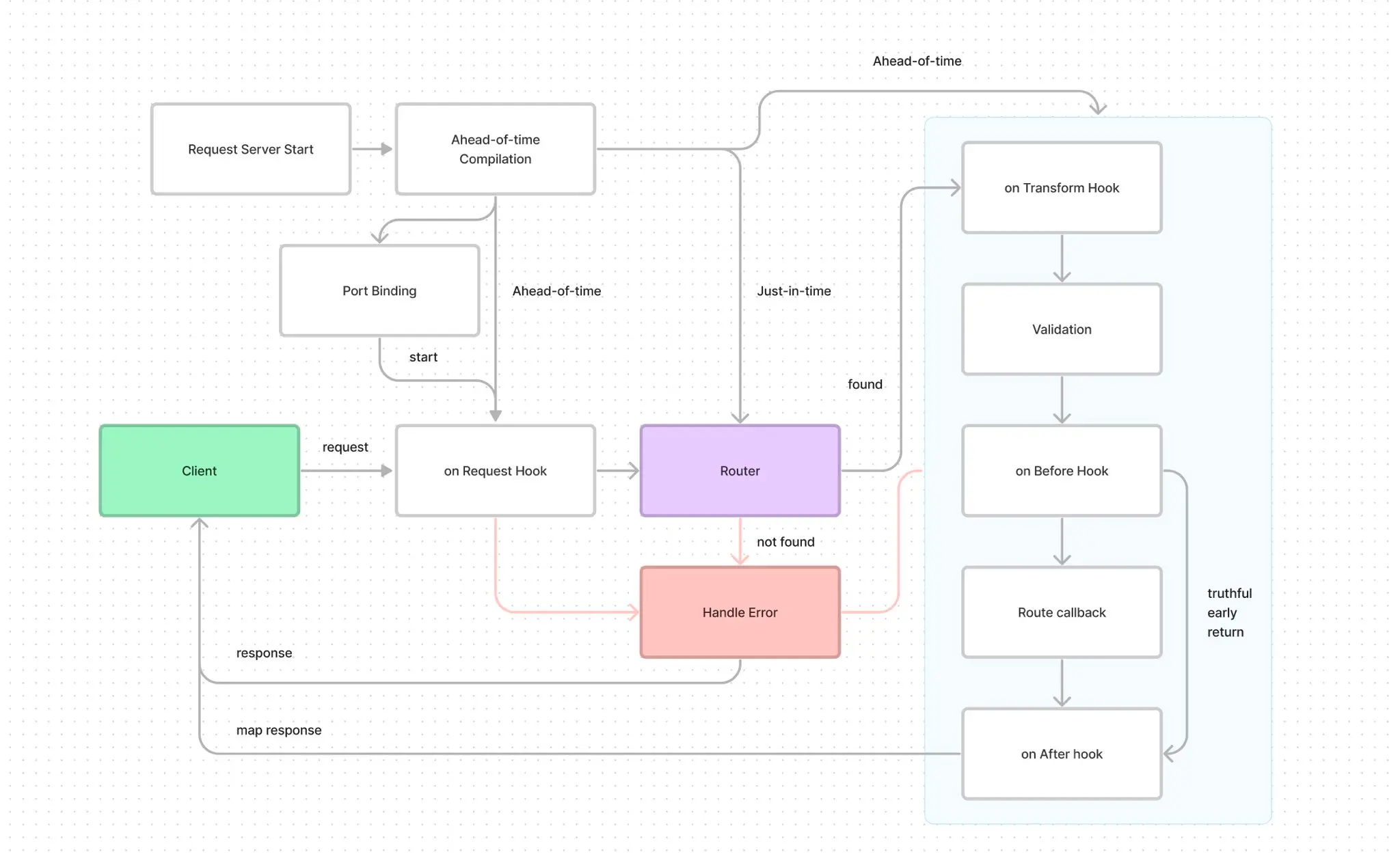
For any metric, data-collection or logging purpose, you can use onAfterHandle to run the function to collect metrics. However, this lifecycle isn’t executed when the handler runs into an error, whether it’s a routing error or a custom error provided.
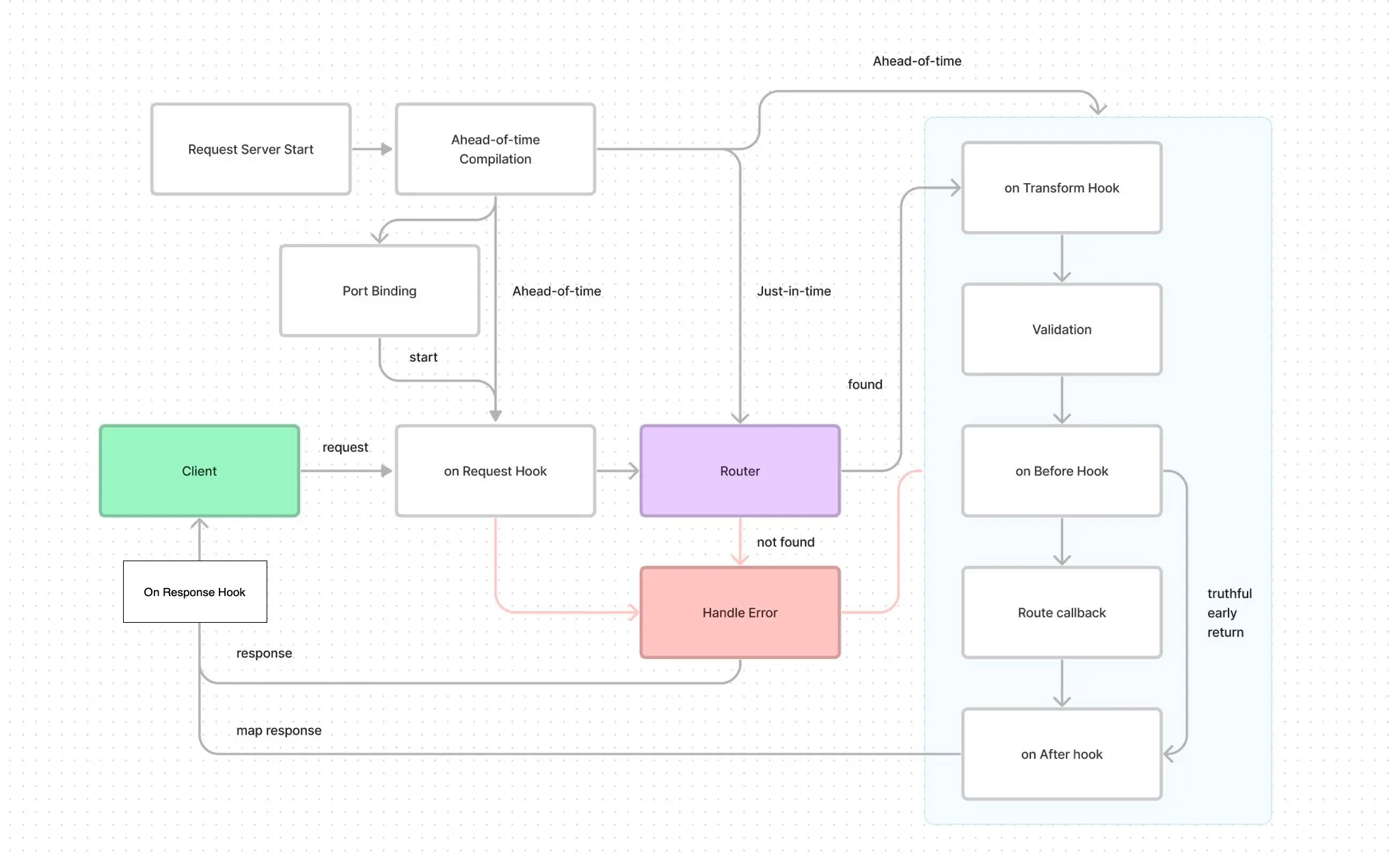
This is why we introduced onResponse to handle all cases of Response.
You can use onRequest, and onResponse together to measure a metric of performance or any required logging.
Quoted
However, the onAfterHandle function only fires on successful responses. For instance, if the route is not found, or the body is invalid, or an error is thrown, it is not fired. How can I listen to both successful and non-successful requests? This is why I suggested onResponse.
Based on the drawing, I would suggest the following:
Notable Improvement:
Section titled “Notable Improvement:”- Added an error field to the Elysia type system for adding custom error messages
- Support Cloudflare worker with Dynamic Mode (and ENV)
- AfterHandle now automatically maps the value
- Using bun build to target Bun environment, improving the overall performance by 5-10%
- Deduplicated inline lifecycle when using plugin registration
- Support for setting
prefix - Recursive path typing
- Slightly improved type checking speed
- Recursive schema collision causing infinite types
Change:
Section titled “Change:”- Moved registerSchemaPath to @elysiajs/swagger
- [Internal] Add qi (queryIndex) to context
Breaking Change:
Section titled “Breaking Change:”- [Internal] Removed Elysia Symbol
- [Internal] Refactored
getSchemaValidator,getResponseSchemaValidatorto named parameters - [Internal] Moved
registerSchemaPathto@elysiajs/swagger
Afterward
Section titled “Afterward”We have just passed a one year milestone, and are really excited about how Elysia and Bun have improved over the year!
Pushing the performance boundaries of JavaScript with Bun, and developer experience with Elysia, we are thrilled to have kept in touch with you and our community.
Every update keeps making Elysia even more stable, and gradually provides a better developer experience without a drop in performance and features.
We’re thrilled to see our community of open-source developers bringing Elysia to life with their projects like:
- Elysia Vite Plugin SSR allowing us to use Vite Server Side Rendering using Elysia as the server.
- Elysia Connect which made Connect’s plugin compatible with Elysia
And many more developers that choose Elysia for their next big project.
With our commitment, we also recently introduced Mobius, an open-source TypeScript library to parse GraphQL to TypeScript types without relying on code generation by using TypeScript template literal types entirely to be the very first framework to achieve end-to-end type safety without relying on code generation.
We are incredibly thankful for your overwhelming continuous support for Elysia, and we hope to see you pushing the boundaries together in the next release.
As this whole new world cheers my name
I will never leave it to fate
and when I see a chance, I will pave the way
I calls checkmate
This is the time to breakthrough
So I will rewrite the story and finally change all the rule
We are maverick
We won’t give in, until we win this game
Though I don’t know what tomorrow holds
I’ll make a bet any play my cards to win this game
Unlike the rest, I’ll do my best, and I won’t ever lose
To give up this chance would be a deadly since, so let’s bet it all
I put all my fate in used let the game begin